
User Research & Insights, Interaction Design, Visual Design, UX Design
2022-2023
In day-to-day operations, orders are rarely static. Customers add items mid-meal or request changes. Staff need tools that support those constant changes, a solid system that allows flexible order updates, streamline coordination, and keep service moving smoothly, even during peak times.
Changes happen mid-service and staff don’t have time to think twice. The challenge was to design an experience that stays responsive under pressure, clear even when the screen is full, and flexible enough to match how teams actually work on the floor.
Orders aren’t static and constantly evolving
Many order systems assume a one-time entry, but in reality, items get added or changed after the bill is opened. Designing for this meant supporting ongoing edits without breaking the flow or confusing the user.
Clear action paths, even in edge cases
Edge cases like voided items, split bills, or failed payments often create friction. Building in ways to handle these calmly, without cluttering the main flow, was part of the design balancing act.
One interface, many roles
Staff, kitchen crew, and managers might all interact with the same screens. Designing an shared system that stays intuitive across roles while still respecting permission boundaries was a key challenge.
We combined qualitative and quantitative research to confirm we were solving real problems
Qualitative Research
Conducted user interviews with restaurant owners and staff in Indonesia to understand how they handle daily operations, track orders, manage promotions, and process payments.
Quantitative Research
Ran surveys to identify the most common pain points and feature priorities, helping define the focus areas for Trofi.
Due to confidentiality, I’m unable to disclose specific research details in this module.
Crafted for order handling
The features in Order Management were designed with a modular and iterative approach. The process began with mapping out the operational needs of restaurants, followed by crafting user flows that align with how cashiers and staff actually work.
Throughout development, each UI element was tested directly in real-world settings to ensure relevance and minimize friction. Several iterations were made to incorporate user feedback, especially for handling complex orders, status changes, and void processes involving multiple supervisors in branch setups.
The bigger picture
The main goal is to help staff manage ongoing orders smoothly, from adding new items to voiding mistakes, without breaking the flow. Every action is designed to be quick, clear, and easy to track, so daily operations stay on point.
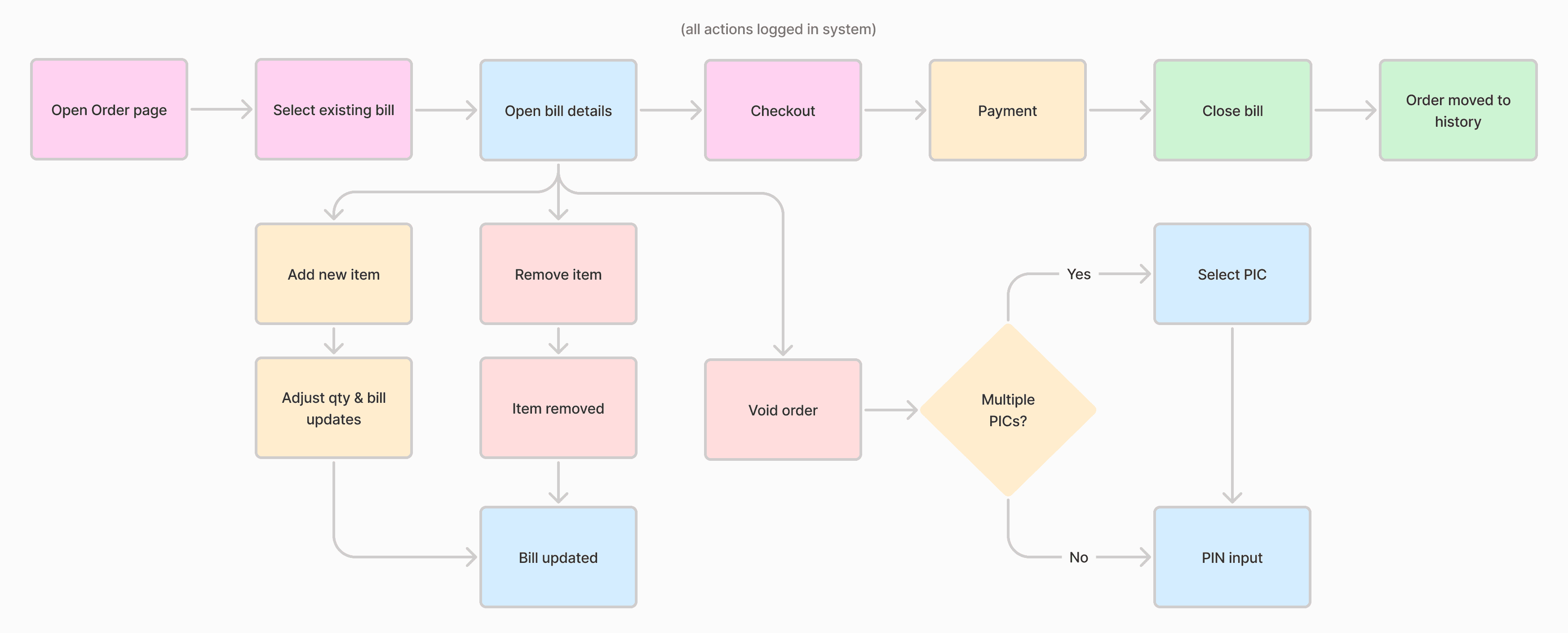
Image: User journey flow
Optimized for mobile & tablet
This flow is available only via the app, optimized for touchscreen use on mobile and tablet devices. The layout and interactions are crafted for quick access and real-time handling on handheld devices.
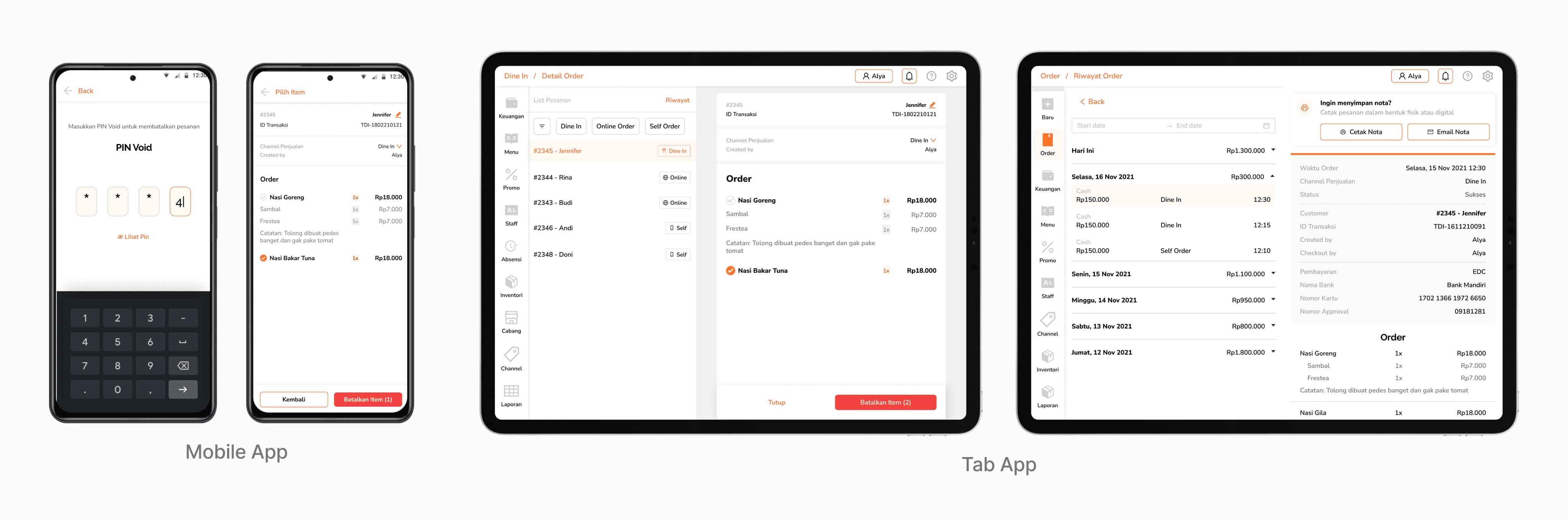
Image: Trofi responsive design
Update orders on the fly
After reviewing a customer's total order, users can choose to either proceed with checkout or tap Process Order—this sends the order to the Open Bill queue. This flow was designed to accommodate dine-in customers who prefer to pay after eating.
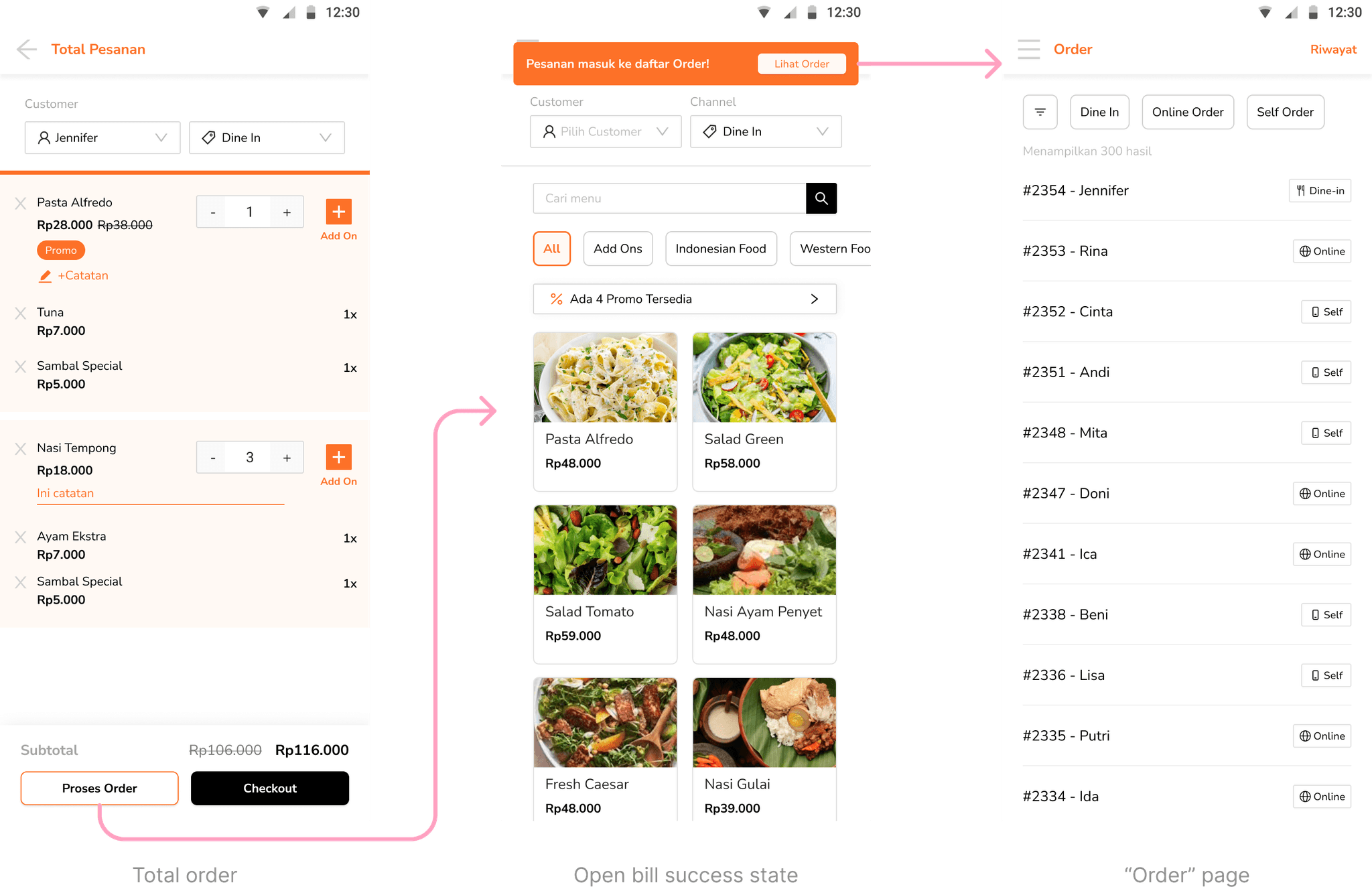
Once processed, the order appears on the Order Page, the central hub for managing ongoing transactions in the restaurant. Orders are listed chronologically, with the most recent at the top. A filter is available to switch between different sales channels, helping users quickly find the orders they need.
From this screen, staff can open any order to review its details, proceed to checkout, or make changes such as editing customer info or adding/removing items.
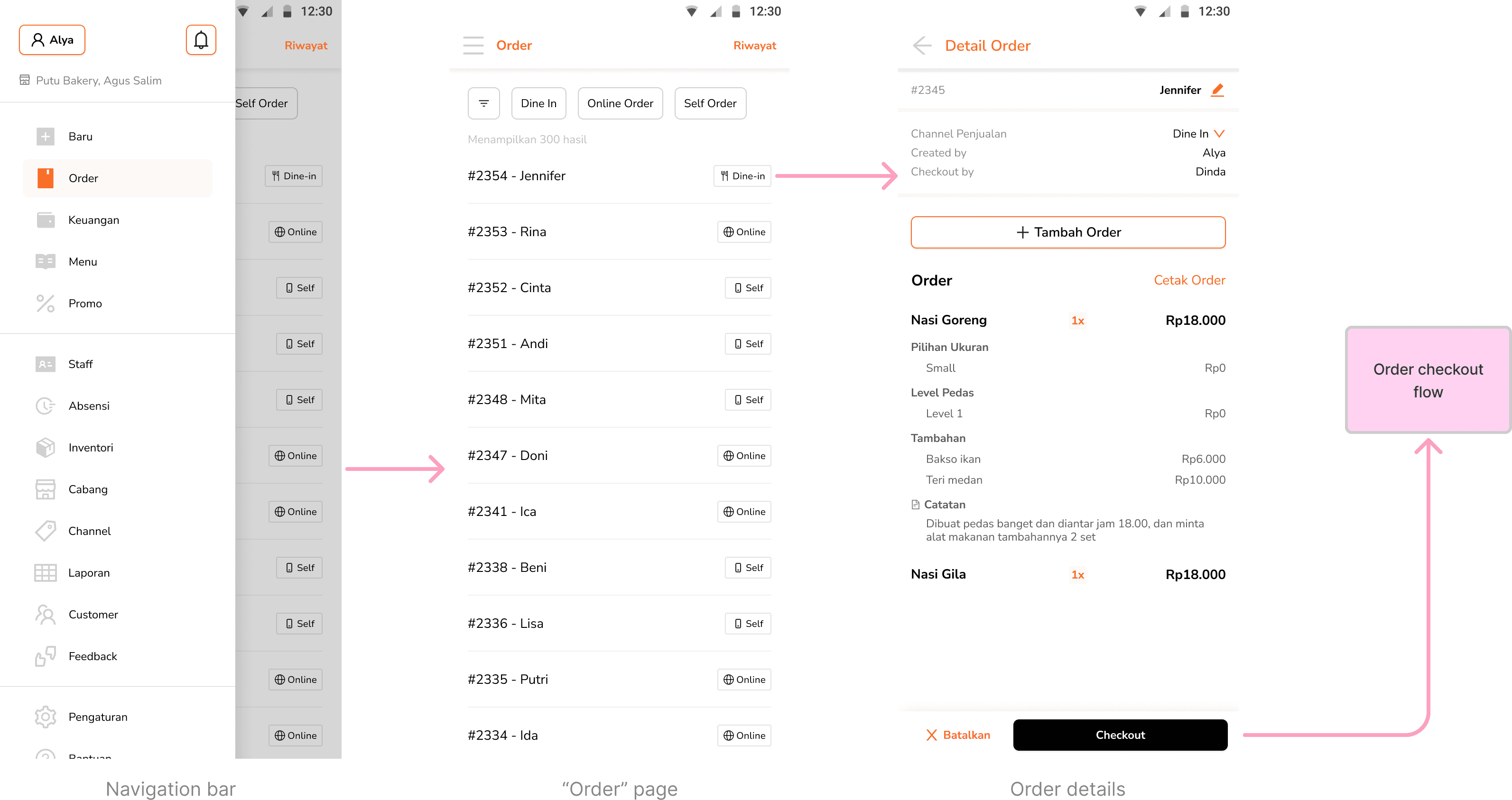
Image: Open bill green flow
Adding to an Open Bill
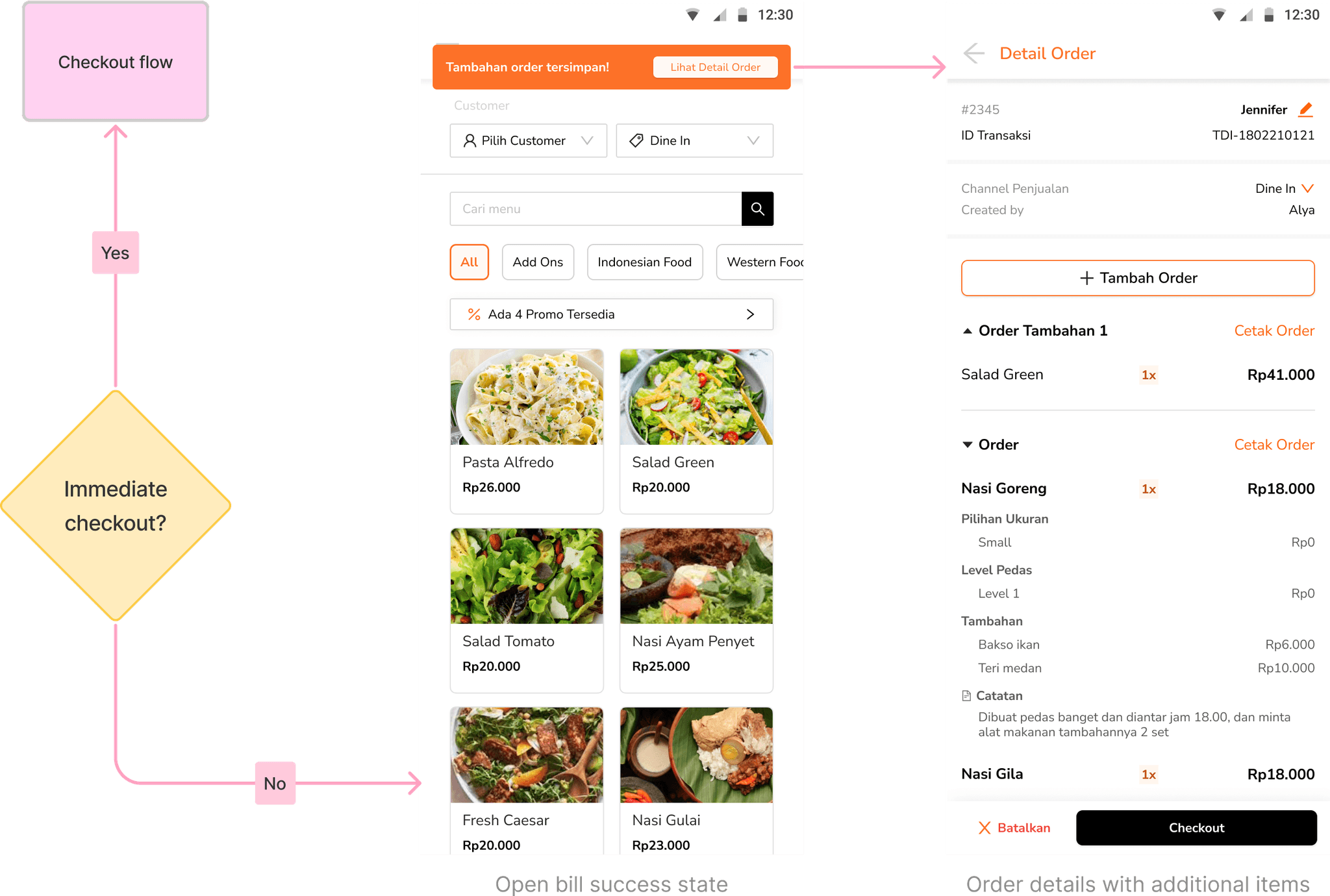
While an order is still open, users can easily add new items through the Add Order button. This triggers the standard menu flow (adding items to the cart) with a small adjustment at the end: users can choose to either checkout immediately or send the items back into the existing bill.
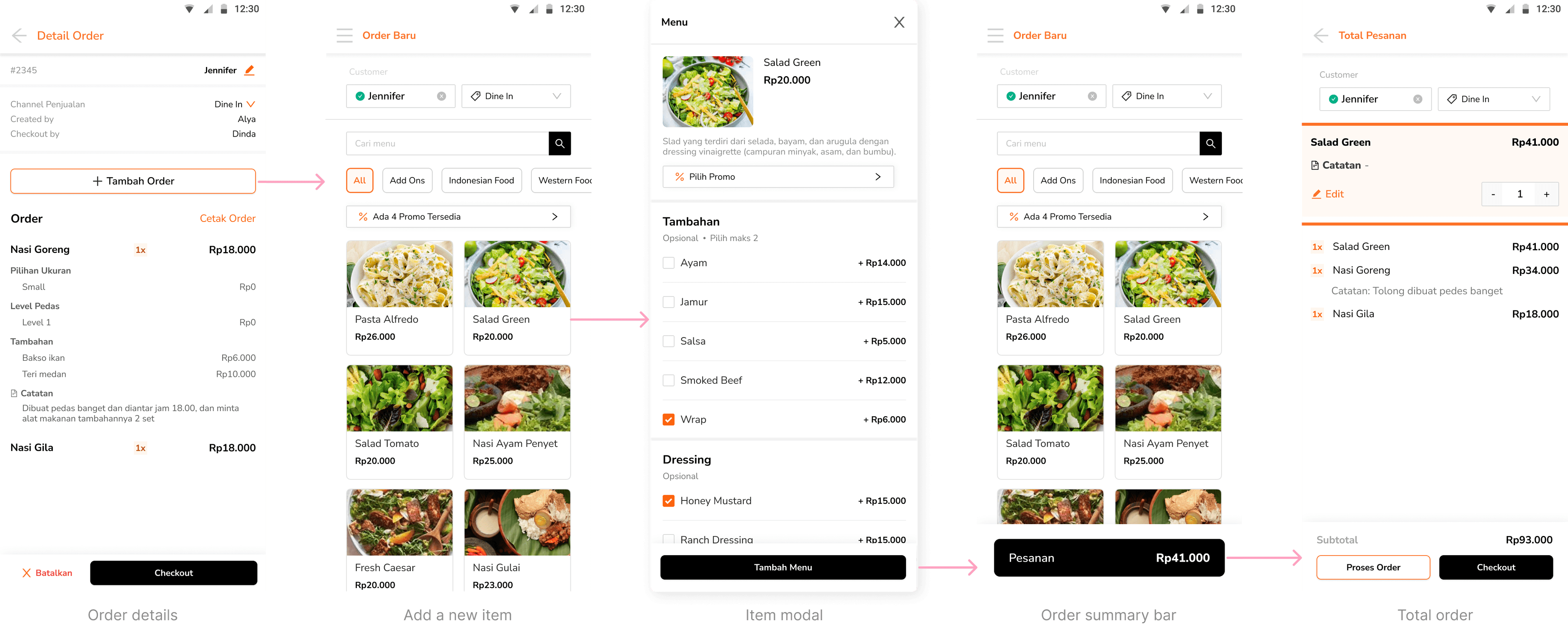
If added back to the bill, the new items are grouped and labeled as “Additional Order (#)” to help distinguish each update. This structure not only keeps the bill organized, but also supports separate receipt printing for each addition, helping kitchen staffs stay aligned on what’s new.
Item-level or full cancellation
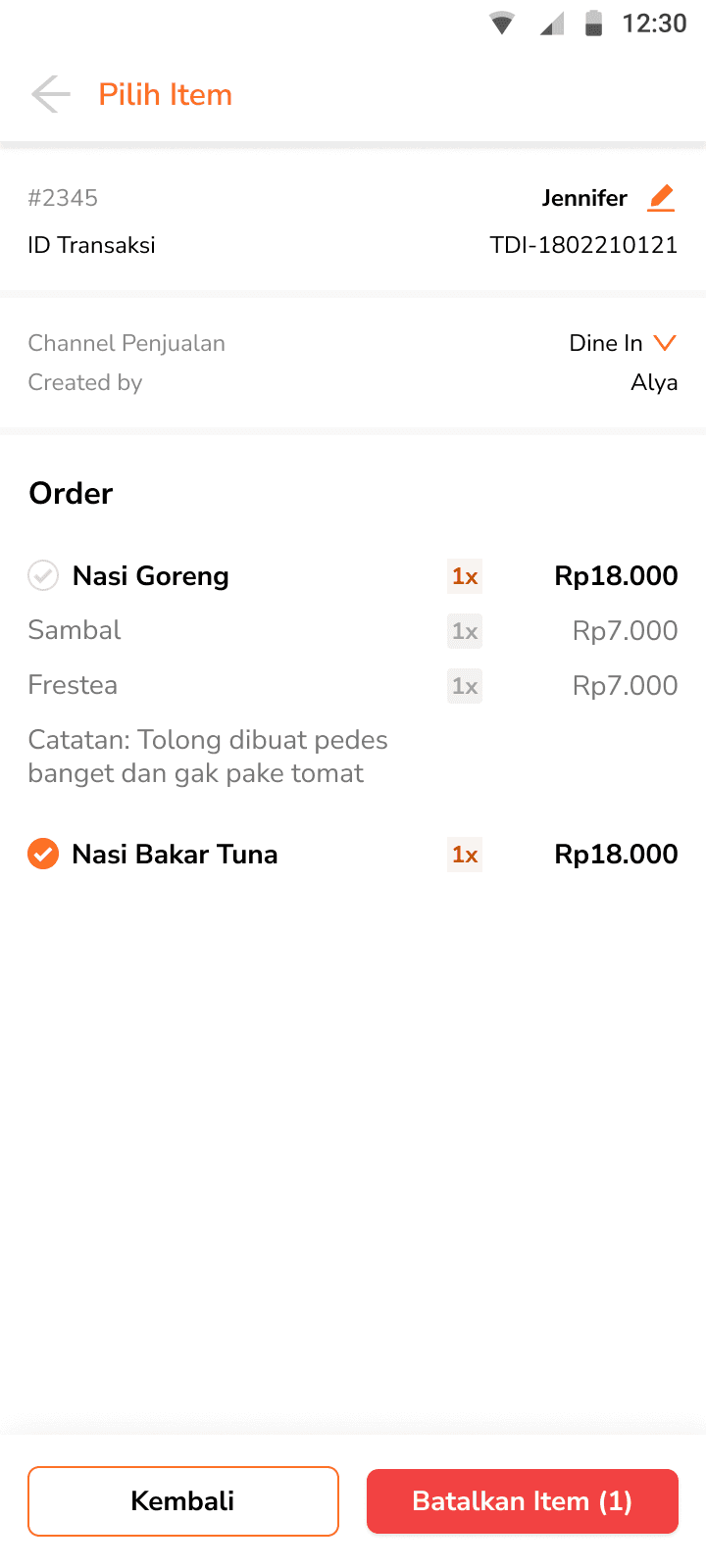
When there are multiple items in an order, users are given two cancellation options: remove individual items or void the entire order. If users choose to remove specific items, they’ll be taken to a selection flow to pick and delete items one by one.

Image: Removing a single item
If there's only one item in the order—or if all items are selected for removal—a confirmation modal will appear to confirm the full cancellation.
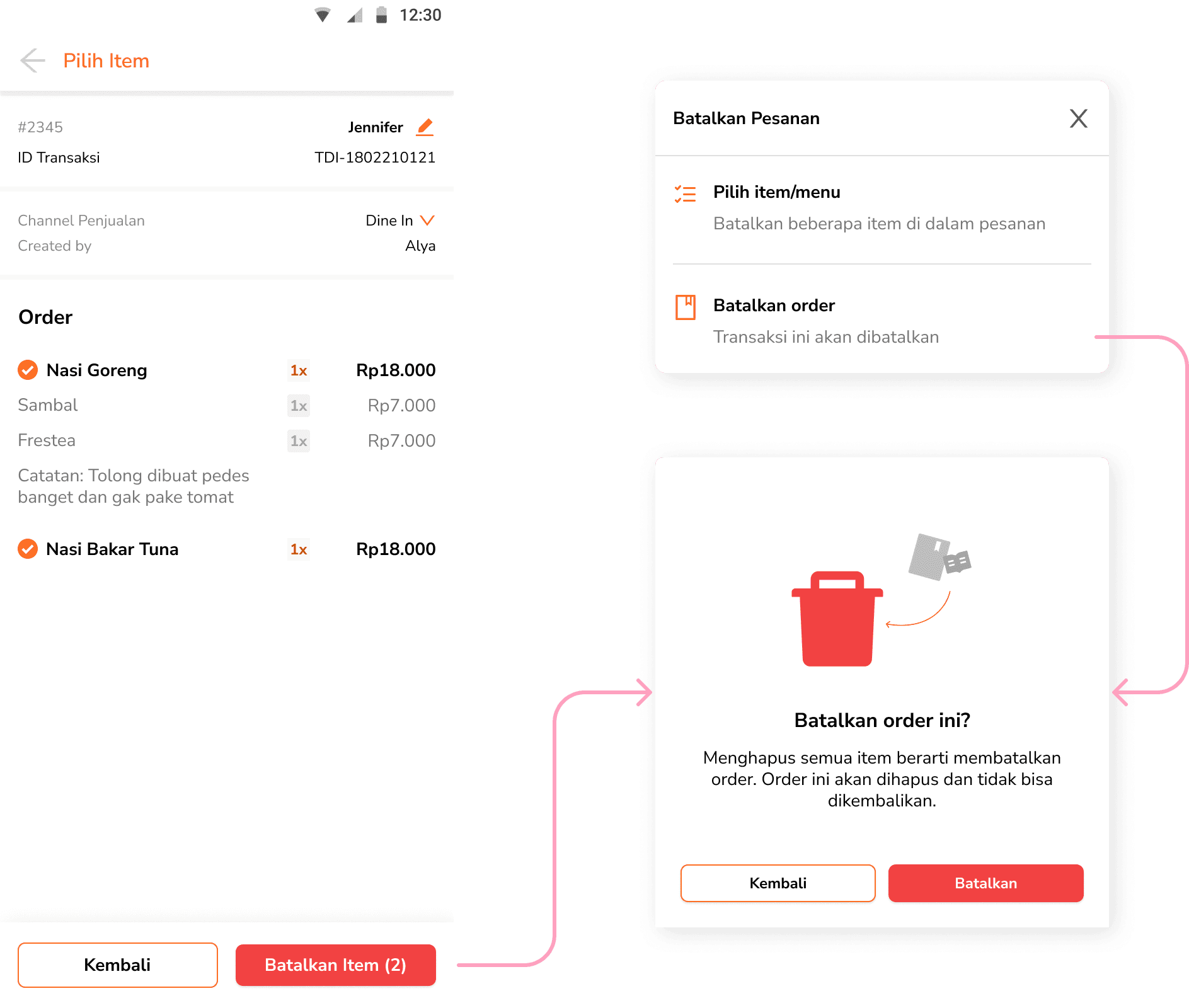
Image: Removing all items and full cancellation
After removing items or a full order, the system prompts users with a stock return modal, asking whether the used inventory should be restored. This ensures flexibility depending on real-world conditions (e.g. if ingredients have already been prepared).
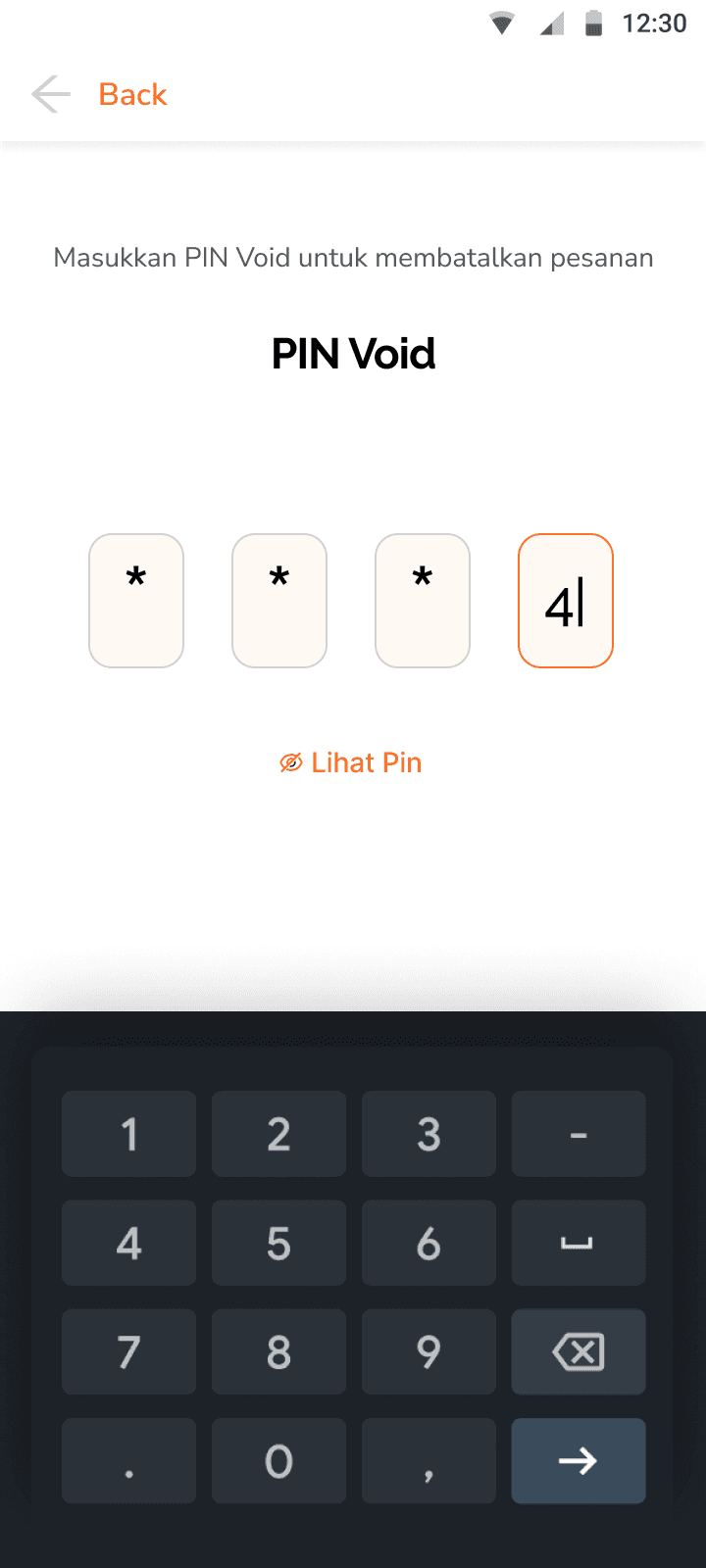
Since voiding orders is considered a sensitive action, the system requires users to enter a pre-set PIN tied to a specific role. This added step ensures accountability. Details on this flow are covered in the next section on Void Orders.
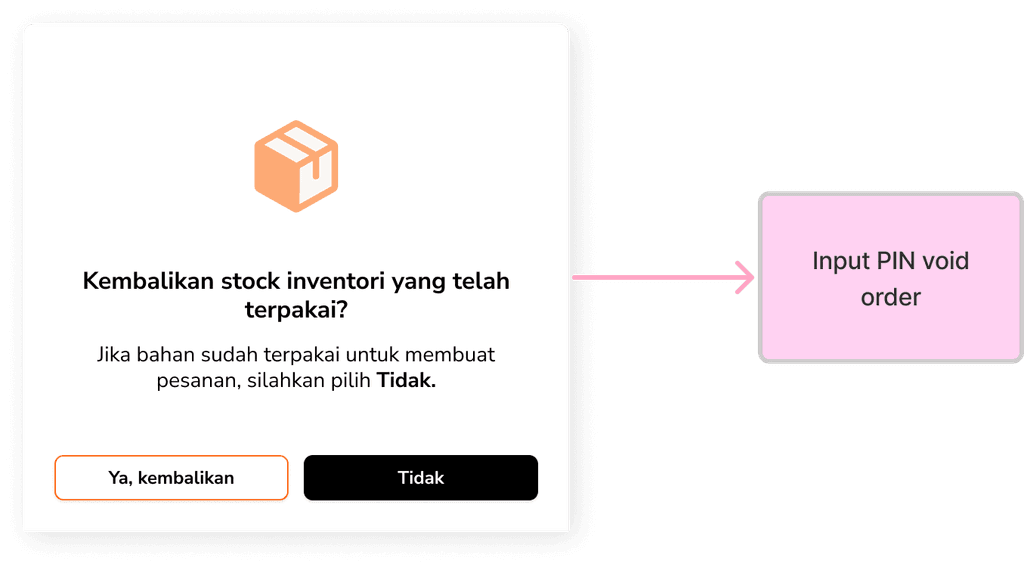
Image: Stock return prompts
Keep a clear trail of every transaction
To help users easily trace past activity, a persistent “History” button is placed at the top bar of the Order page. It provides quick access to all completed orders in all sales channels.
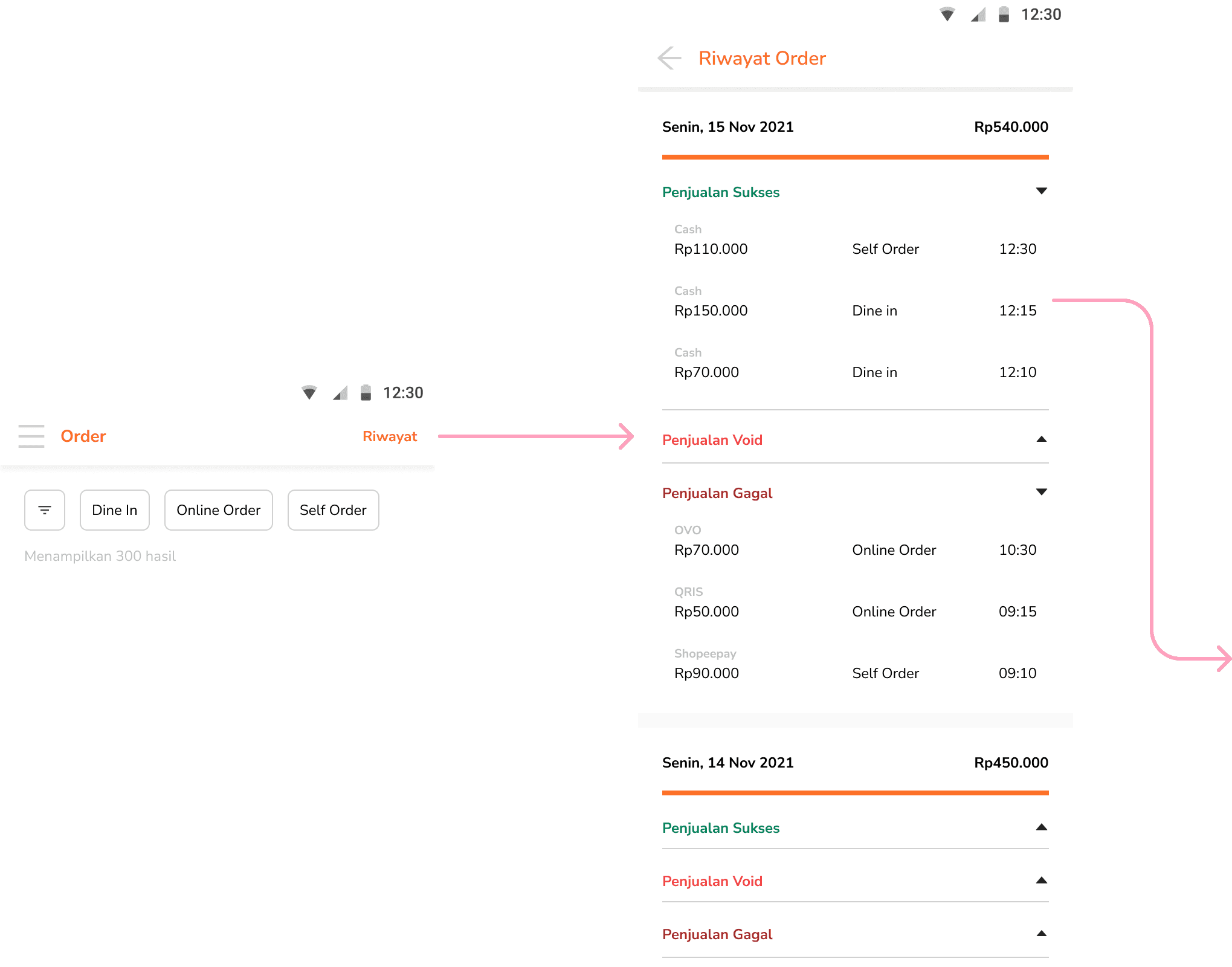

Image: Opening Order Details through Order History
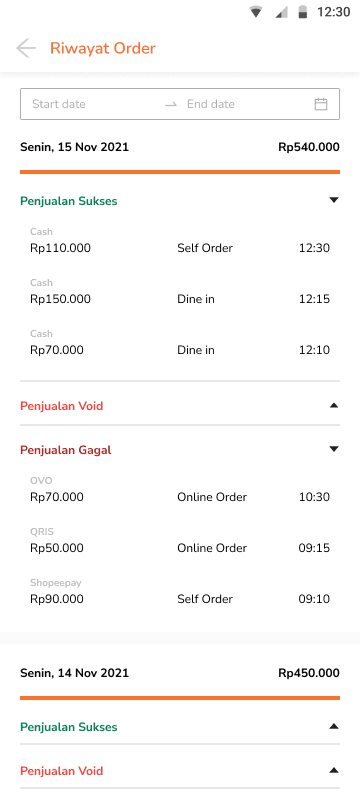
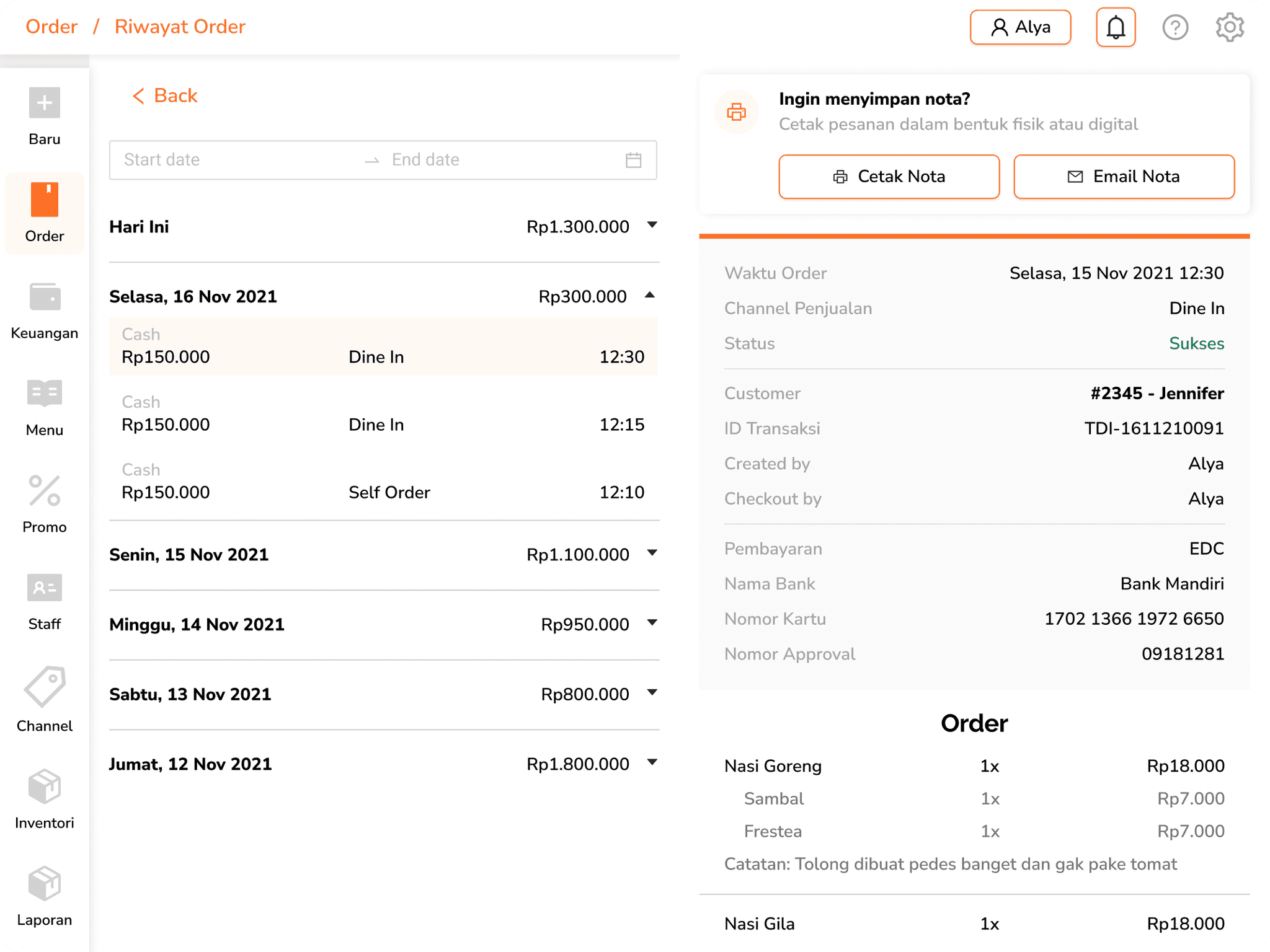
Order history is organized by each day the restaurant operates. Within each date, orders are further classified into three categories: successful sales, voided transactions, and failed orders. Tapping on any order opens a detailed view (Order Details).
Frrom here, users can re-check order details, track which staff handled them, or even process voids and feedback when needed. Designed to stay accessible without disrupting ongoing operations, this feature helps maintain clarity and accountability throughout the service flow.
In the initial version, this feature was kept simple without date filters or advanced sorting, focusing on establishing a clean and reliable log first.
Secured cancellations with proper checks
Whenever a user attempts to void an order—whether from an open bill or the order history—they’ll always be prompted to confirm inventory adjustments and input a designated Void PIN. This extra step helps maintain inventory accuracy and ensures only authorized roles can cancel past transactions.
Voiding with control
In Store Settings, users are required to set a dedicated Void PIN that is used specifically for canceling orders. While voiding is a common operation, this extra layer ensures a sense of security, especially for businesses with multiple staff members.
Other than that, Trofi also supports staff management where store owners can assign specific roles. In this case, only users with the Master or Manager role can perform void actions, both of which are protected by the previously set PIN. Staffs without these roles must enter the designated Void PIN to proceed, creating a secure but flexible environment for order management.

Void authorization in Outlets
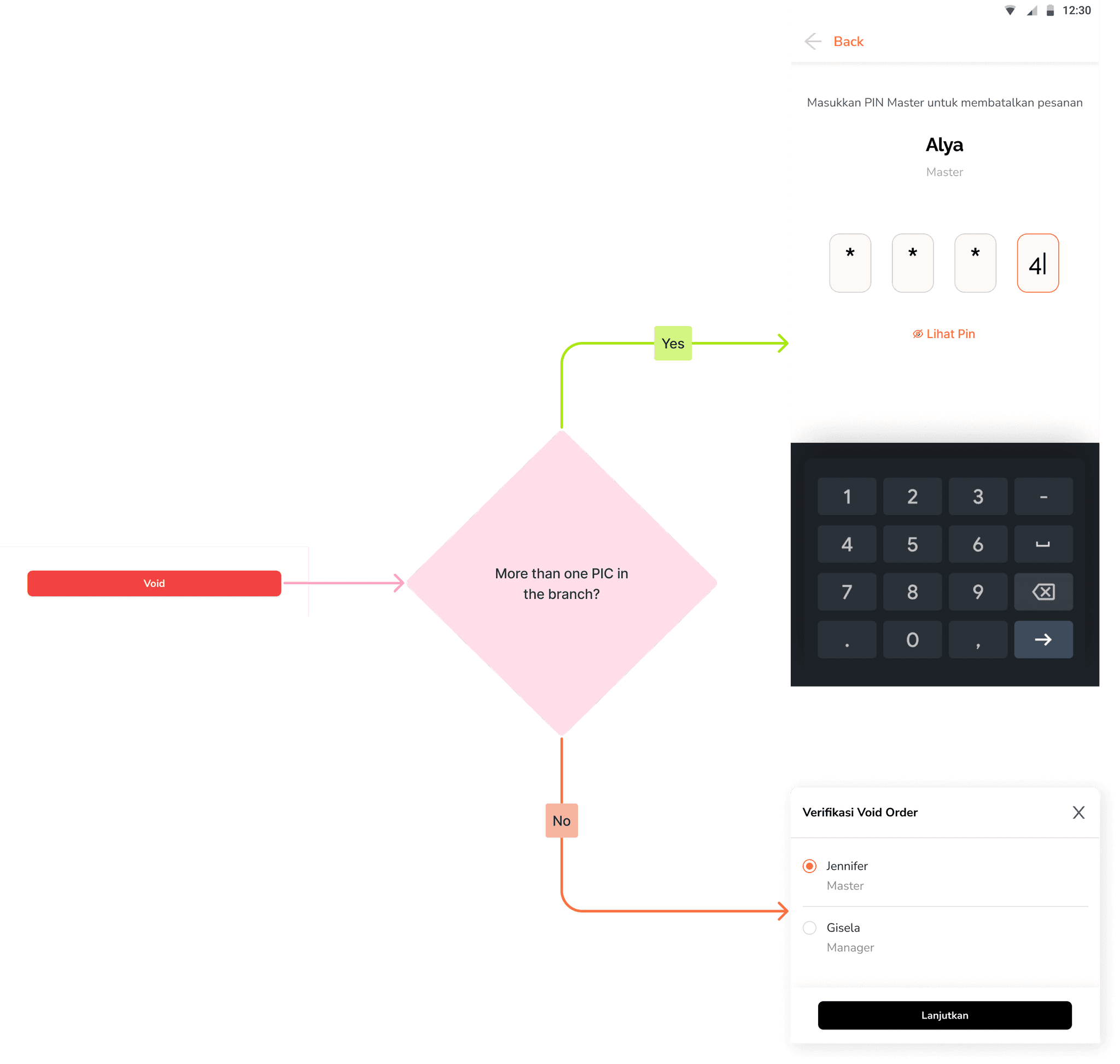
When Trofi introduced the outlet feature, a new scenario emerged: some outlets have more than one person in charge (PIC). In these cases, the system requires the user to choose one of the available PICs before proceeding with a void action. Once selected, the next screen prompts the Void PIN entry, which must match the PIN of the chosen PIC. This flow ensures clear responsibility and accountability in multi-PIC environments, reducing the risk of unauthorized voids.
More than a summary
Once an order is complete, the story doesn’t always stop there. This section captures those things that happen after the meal but still matter to the business. These touchpoints help restaurants stay connected and continuously improve.
Print it or Ping it
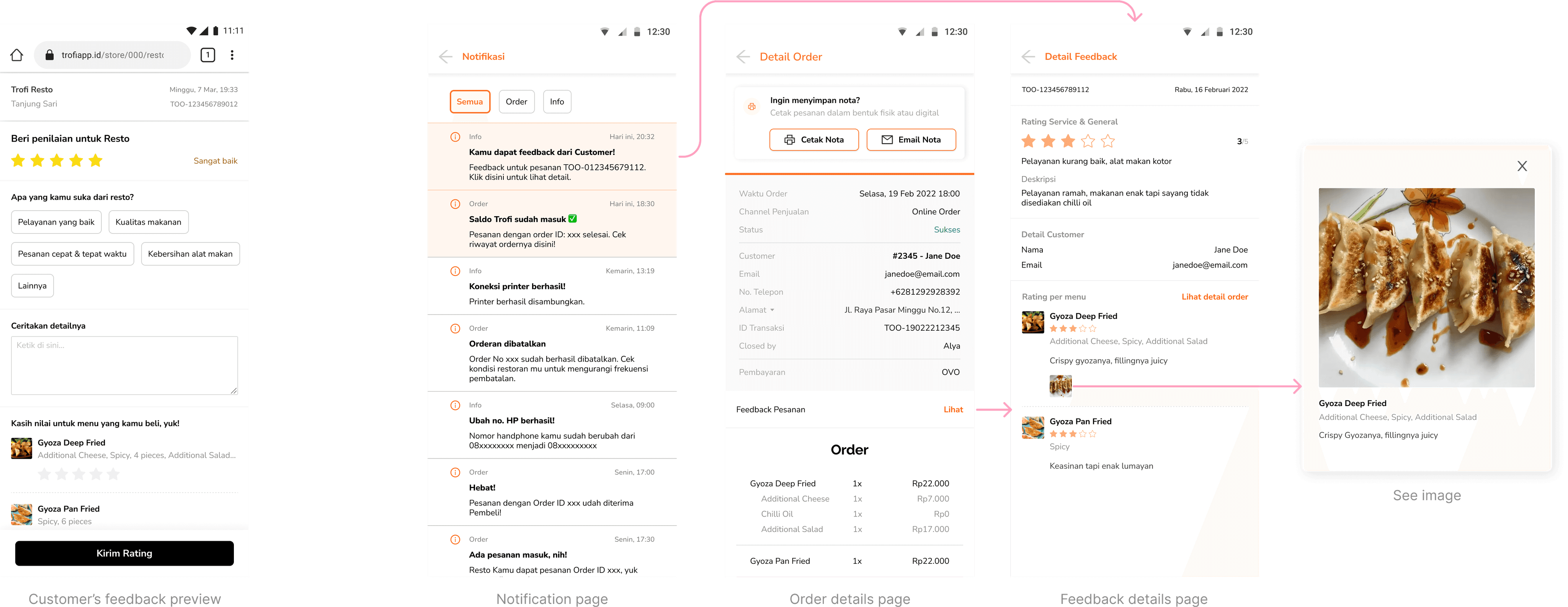
Customers often need receipts for different reasons—be it for reimbursement, documentation, or simply habit. We added two flexible options: print the invoice on the spot, or send it via email. Both can be done from the order details screen with just a few taps, making post-checkout smoother for both staff and customers.

A quiet channel for feedback
For online orders, Trofi offers a built-in feedback space. Customers can leave notes about their food, experience, or service quality. These insights are then recorded directly in the Order Details, giving businesses a quiet but powerful channel to listen, reflect, and improve.
Polishing the Order flow
Date picker for easier tracing
As the order history grows over time, scrolling through daily records becomes less efficient. A date picker would allow users to quickly jump to specific days, making it easier to trace past orders. This is especially useful for managing reports, handling complaints, or reviewing performance.

A clearer path to feedback
Initially, feedback was planned simply as a general review form outside the order flow. But we realized placing it as an additional inside the order details (especially for online orders) created a stronger link between experience and response—making feedback more relevant and easier to manage.
Branch-level void authorization
As Trofi introduced multi-branch support, we needed a clearer way to handle void actions across teams. In cases where a branch has more than one person in charge, users are first prompted to select who will authorize the void. They’ll then be directed to a PIN entry screen, where only the selected person’s Void PIN can proceed.
This ensures proper accountability without adding unnecessary friction to the flow.
Tiny flows major needs
Sometimes the smallest flows reveal the biggest needs. Also, Order flows are never static. Real-world usage uncovered what worked, what didn’t, and what’s next.
Split bill is essential
Originally seen as an edge case, but group dining shows it’s a standard expectation. This became one of the most requested additions moving forward.
Void should be safe (not painful)
PIN verification and role access protect against misuse. But with multiple PICs in a branch, the repeated selection flow can feel clunky. Something to refine.
Printing needs clarity
Restaurants differ: some want printed notes for each action, others find it excessive. Confusion around what’s been printed suggests print logic or settings could be more transparent.
A Lasting Note
Built with purpose, remembered with warmth
Although the work eventually came to an end, it ran successfully for nearly three years and found a place in the daily routines of real users. Many of them shared kind words when it stopped—and that, more than anything, reminded me why I love building things that help ♥︎