User Research & Insights, Interaction Design, Visual Design, UX Design
2022-2023
For restaurants, the sales experience is more than just a point-of-sale process. It directly affects revenue, customer satisfaction, and staff productivity. A smooth add-to-cart, payment, invoicing, and promo process doesn’t just save time, it keeps the business running without unnecessary headaches. That’s why Trofi aims to design a sales flow that feels less like operating a system, and more like working with a reliable partner behind the counter.

Designing sales flows is not just about making things fast; it’s also about ensuring the system remains accurate and adaptable under real-world conditions.
Rush hour pressure
At peak times, the cashier might be juggling multiple orders, answering quick questions from the kitchen, and handling impatient customers all at once. In these moments, even one extra step in the flow can feel like a burden. The challenge is to design a system that responds instantly and reduces decision-making, so staff can focus on service instead of fighting the interface.
Staff turnover and training
Restaurants experience high staff turnover, which means new cashiers or other staffs are constantly stepping in. If it takes too long to understand the system, mistakes are inevitable. A good design should feel almost self-explanatory where staff should be able to learn by doing, not by memorizing manuals. The less training needed, the faster a restaurant can get back to smooth operations.
Free but valuable
Trofi was built to be free for users, but still deliver real value. The challenge was creating a product that looked and felt professional without compromising reliability. Designing with this balance in mind meant carefully choosing which features to prioritize so the system could stay accessible while still earning user trust.
We combined qualitative and quantitative research to confirm we were solving real problems
Qualitative Research
Conducted user interviews with restaurant owners and staff in Indonesia to understand how they handle daily operations, track orders, manage promotions, and process payments.
Quantitative Research
Ran surveys to identify the most common pain points and feature priorities, helping define the focus areas for Trofi.
Due to confidentiality, I’m unable to disclose specific research details in this module.
Building each flow, step by step
In the early design stage, I explored multiple design approaches for four key workflows: Add to Cart, Payment, Invoice, and Promo (discount). Each of these flows plays a crucial role in daily restaurant operations, and I focused on creating clear, efficient interactions that could handle complex scenarios without overwhelming the user.
The bigger picture
In the end of this module, users should be able to:
●ㅤQuickly search and add items to the cart, even during peak hours
●ㅤApply promotions or discounts without errors
●ㅤSelect and process different payment methods
●ㅤView and generate clear, accurate invoices for every transaction
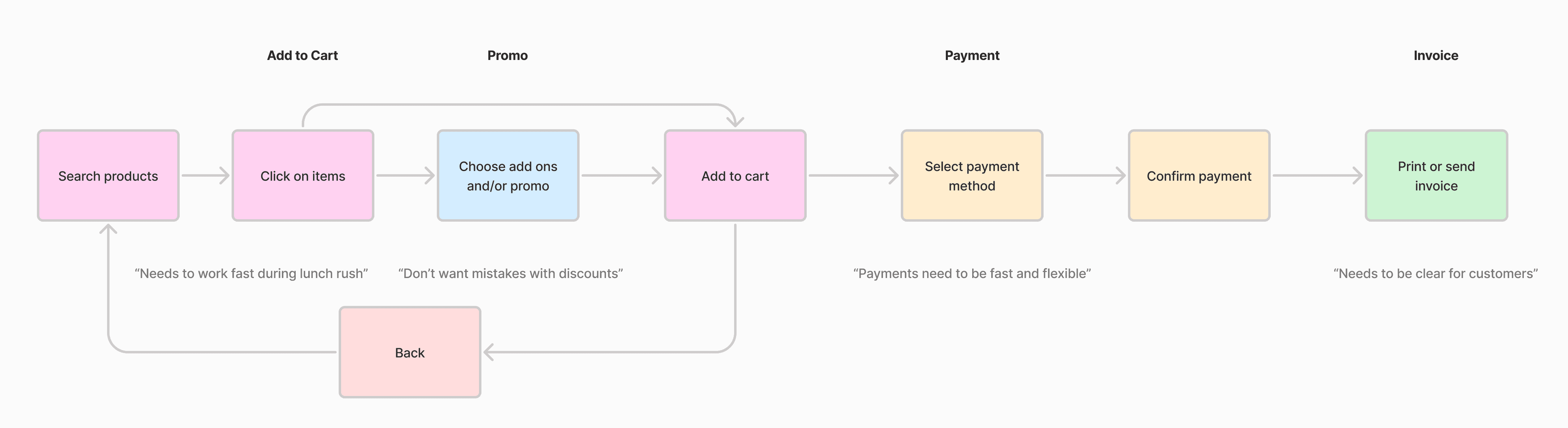
Image: User journey and persona
Persona: Restaurant cashier during lunch rush
Goal: Complete an order quickly, apply a promotion, collect payment, and generate an invoice
No matter the screen size
Designing Trofi meant making sure the experience worked consistently across devices. On mobile and tablet, the focus is speed and keeping service moving, while desktop provides more room for dashboards and deeper business insights.
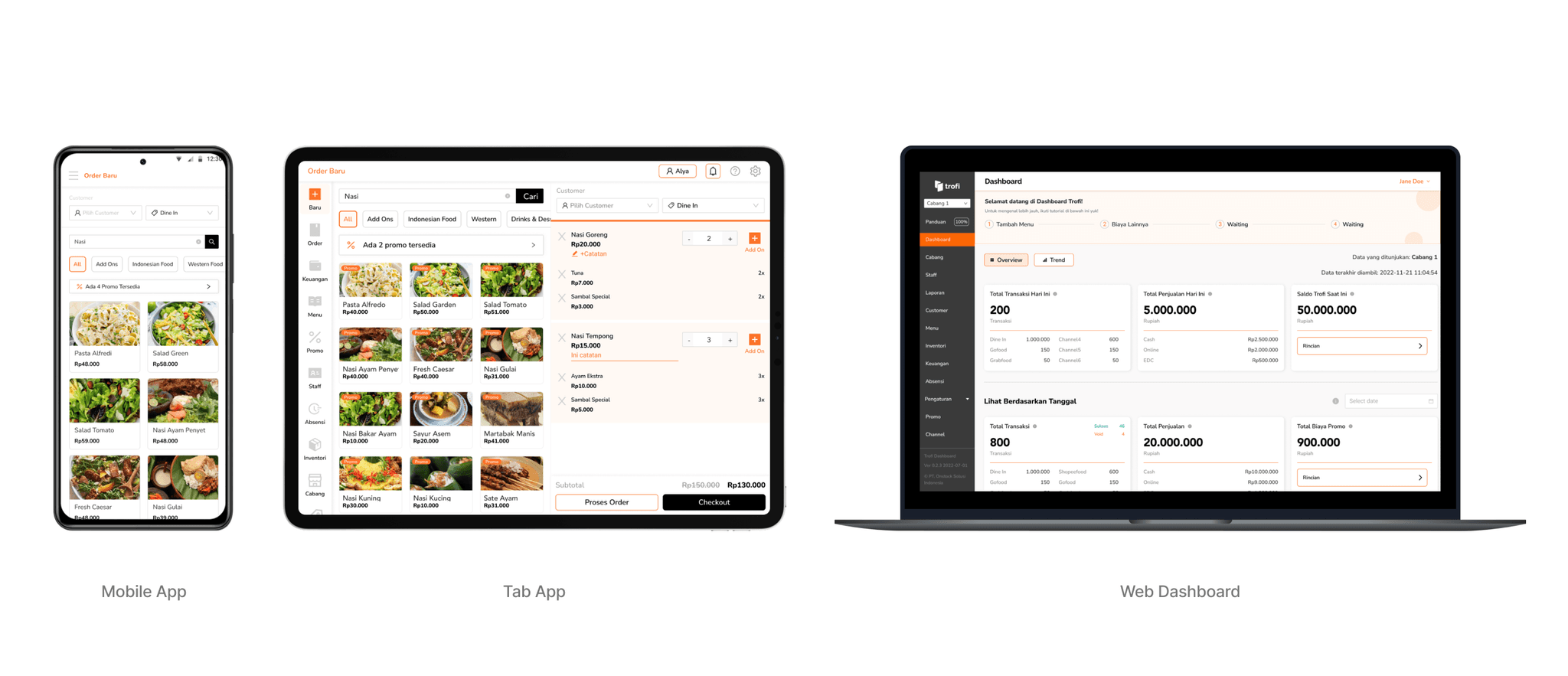
Image: Trofi responsive design
Making busy hours manageable
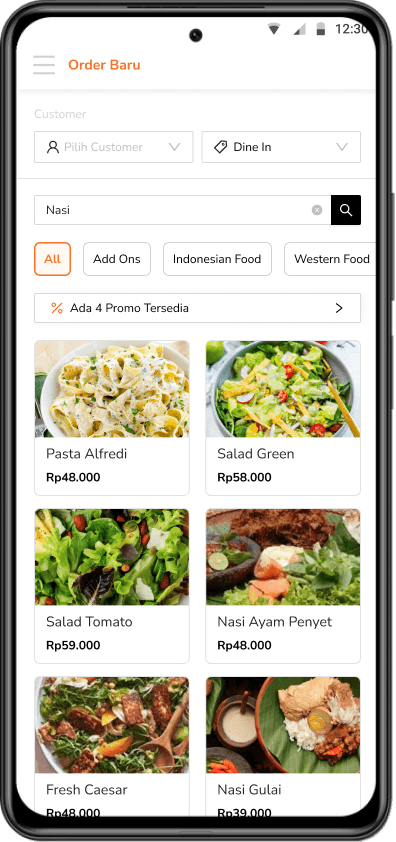
The Add to Cart experience needed to be fast and flexible to keep up with busy service hours. My focus was on reducing steps and helping staff find products quickly, even in large menus.
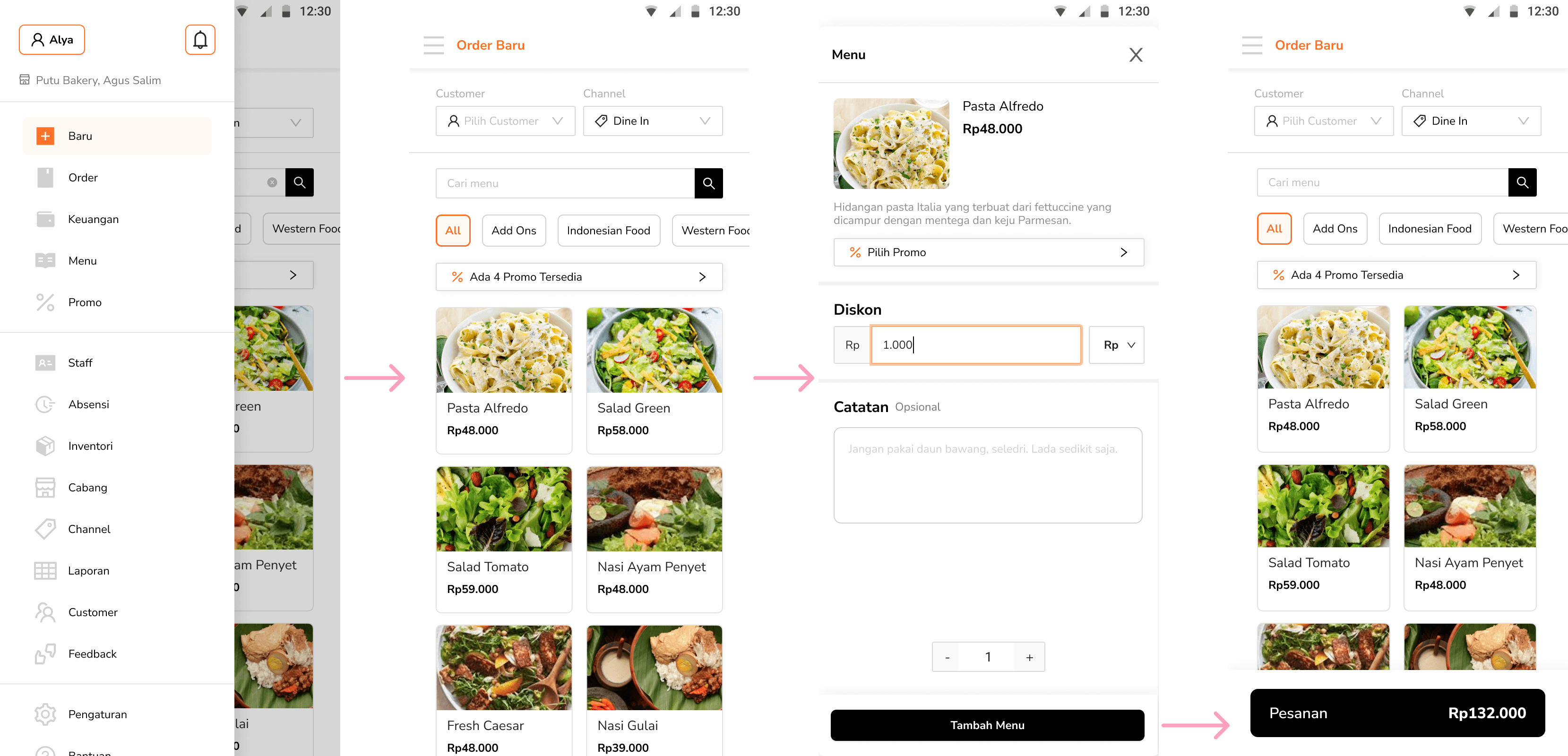
Image: The first step of Add to Cart flow
The Order Baru (new order) menu sits at the top of the navigation bar, since it’s likely the most frequently used feature. Items are added to the total order via a pop-up, maintaining a seamless and focused workflow.
Pick, filter, and go
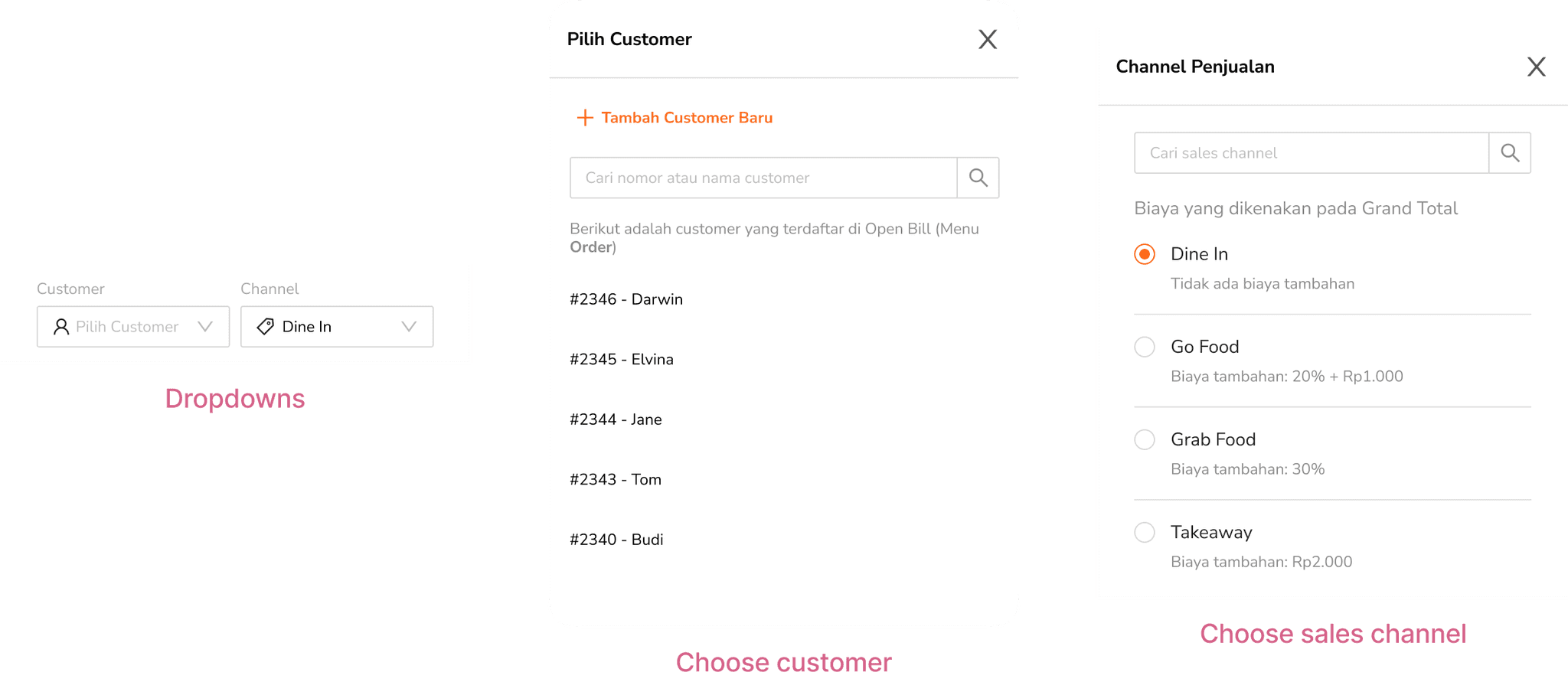
To start every order smoothly, we designed the top section to help staff quickly assign the right customer, sales channel, and easily find products.
In this flow, “Customer” dropdown allows staff to either select an existing customer or quickly add a new one—connected directly to the Customers management menu. This step is optional, so staff can proceed even without selecting a customer.
Meanwhile, the “Channel” option helps record where the order came from, such as dine-in, takeaway, or delivery. This field is required, and the list is fully customizable through the sales channel management system to reflect each restaurant’s unique setup.
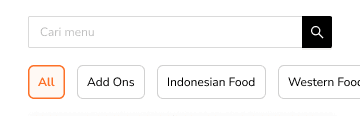
The search bar and scrollable category filters make it easy to browse large menus. Restaurants can also customize the categories to match their needs.
Before checkout
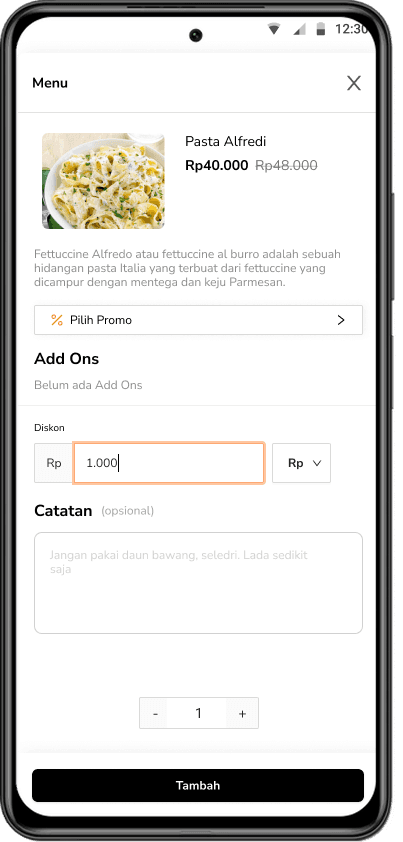
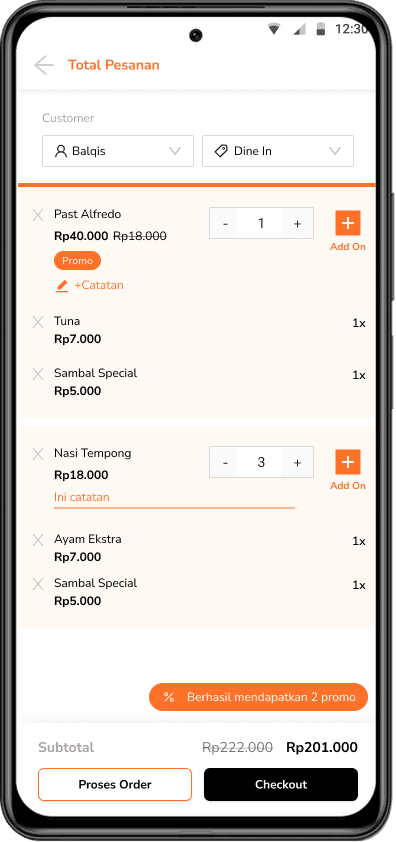
Before heading to checkout, users land on a summary page to review the entire order. Here, they can edit individual items—like adding notes or selecting add-ons. The screen remembers all changes, so even if staff go back to a previous step, the order stays just as they left it.
The "Proses Order" button allows staff to open an open bill for a customer—perfect for cases like dine-in orders. (More on that in the Order Management module)
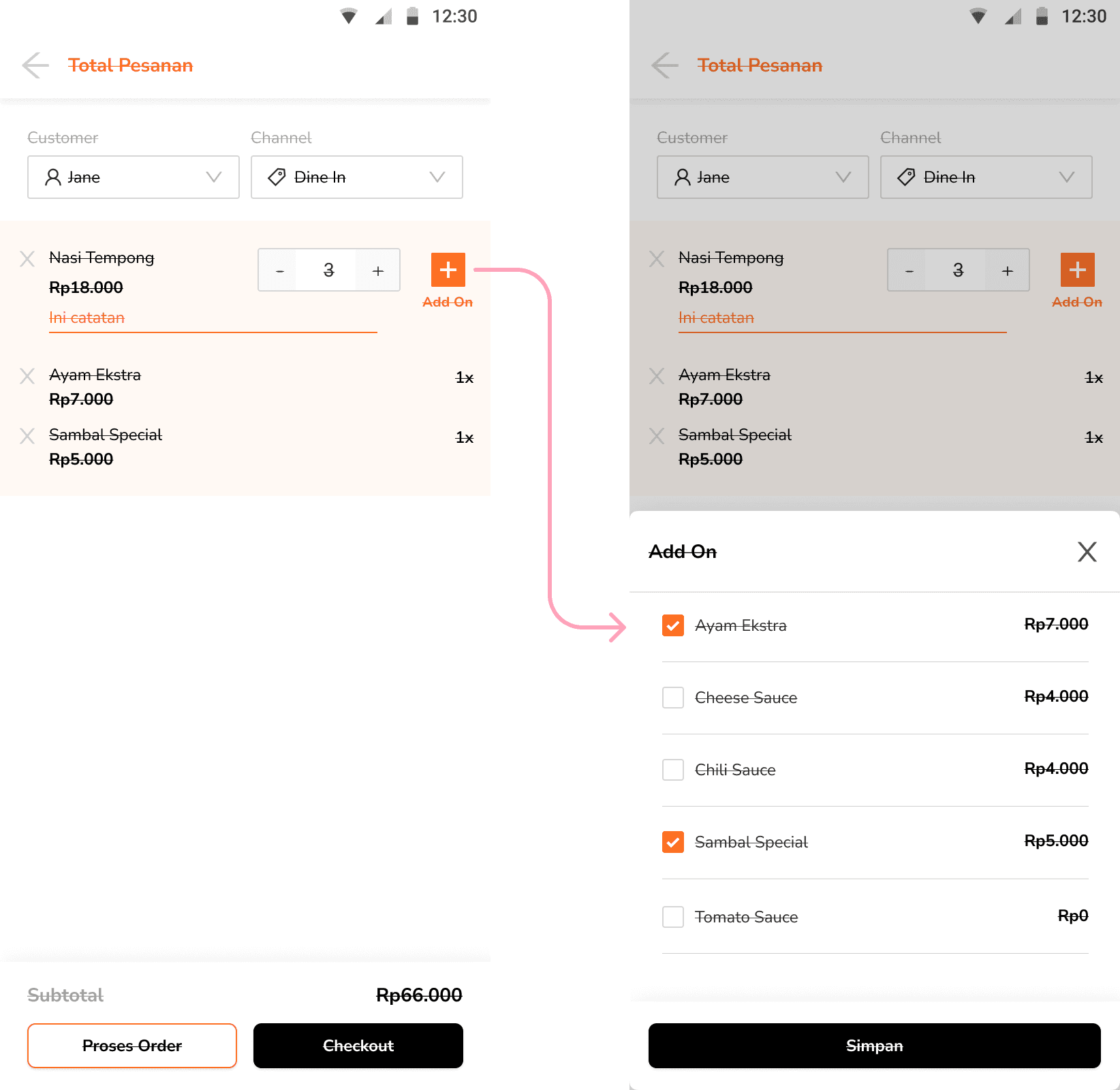
Image: Opening Add On modal
Smooth sailing for discounts
Managing promos should be easy, not a source of errors. I designed this flow so users can apply discounts confidently and avoid mistakes that could affect revenue or customer trust.
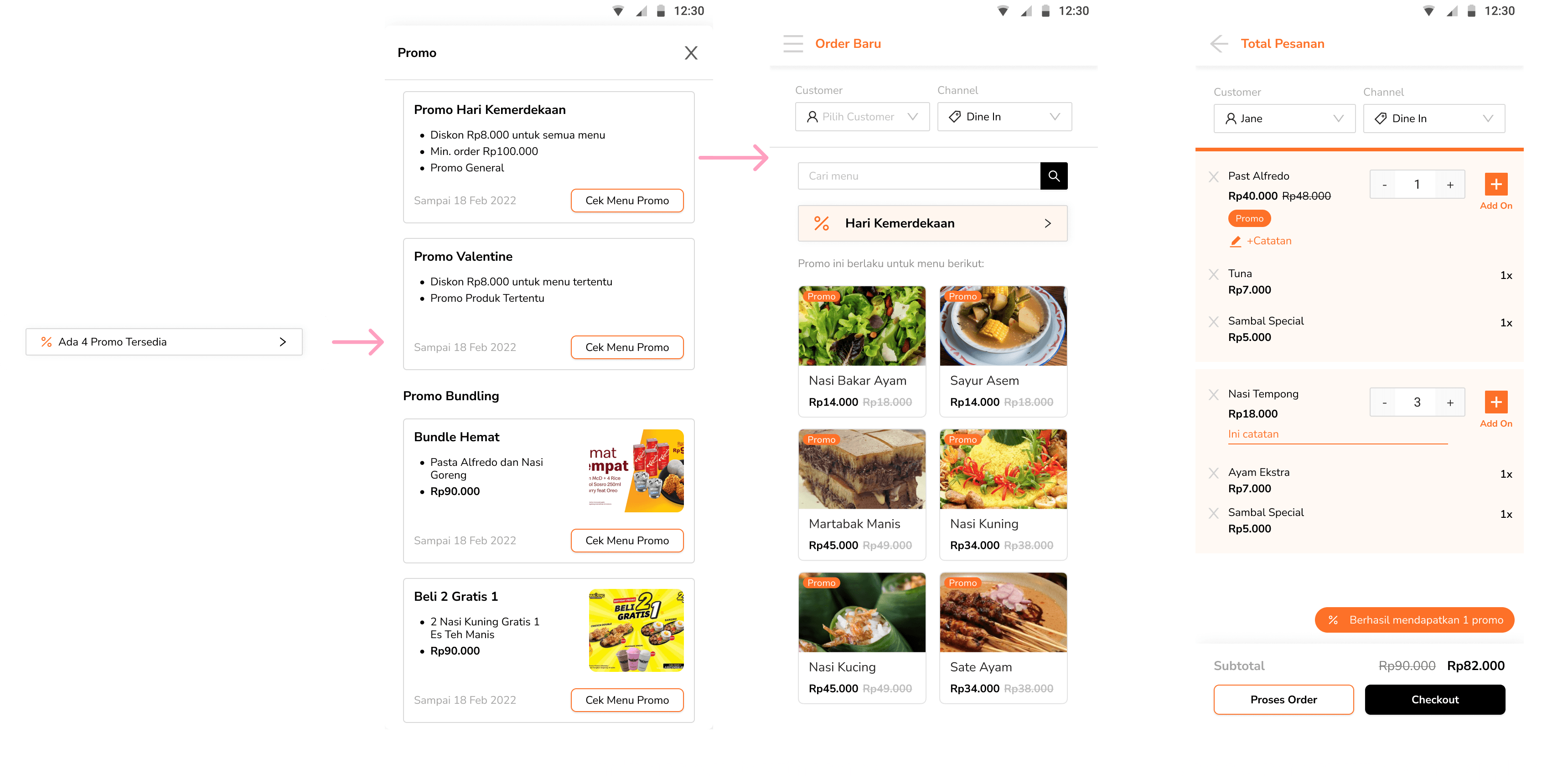
Managing promo
It’s possible to manage promos either generally or for specific products. But details about promo features will be included in different module, so they’re only shown briefly in this section.
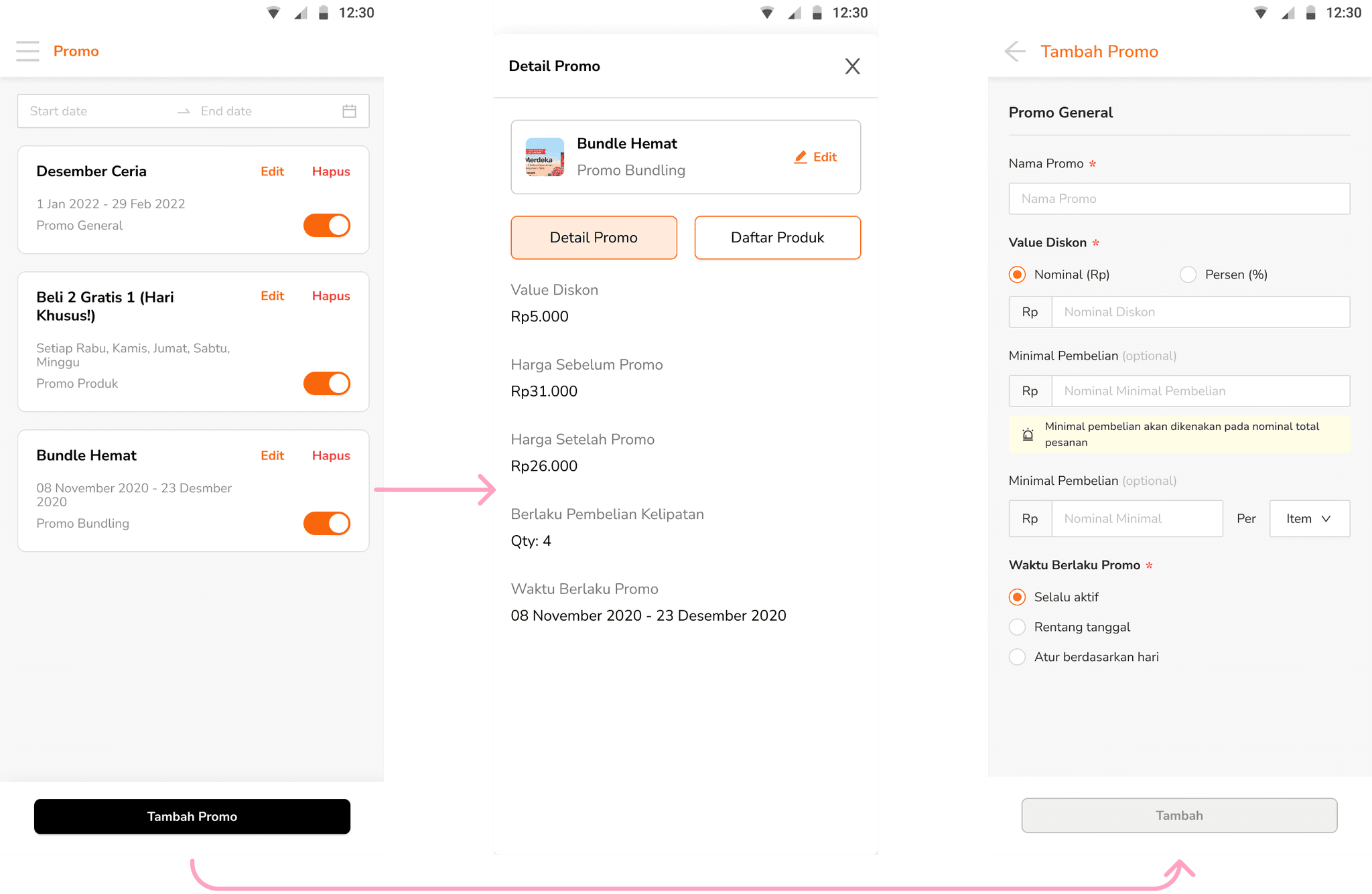
Image: Promo management preview
Pay fast, serve faster
Payment processes in F&B are often rushed and stressful. My goal was to support various payment types while keeping the flow smooth and clear for both staff and customers.
For first-time users, an onboarding screen guides them through how to handle payments, making sure the process feels clear and easy.
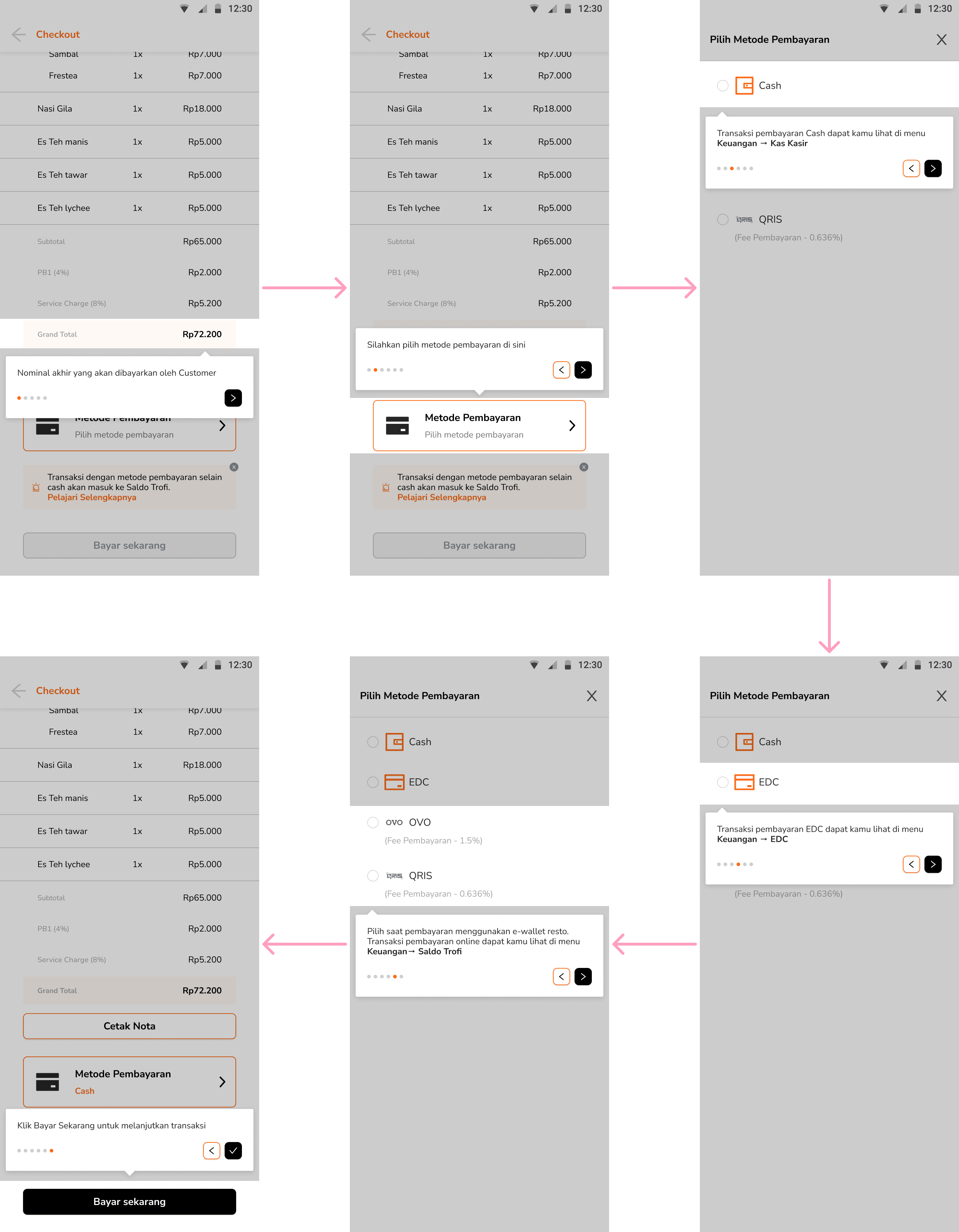
Image: First time payment onboarding process
Once users understand the basics through onboarding, the next step is selecting their preferred payment method.
Choosing payment methods
When users select the EDC (Electronic Data Capture) payment method, additional input fields appear for entering optional credentials that the restaurant might need, such as bank details or approval numbers. For cash payments, users simply enter the cash amount, and the system automatically calculates the change.
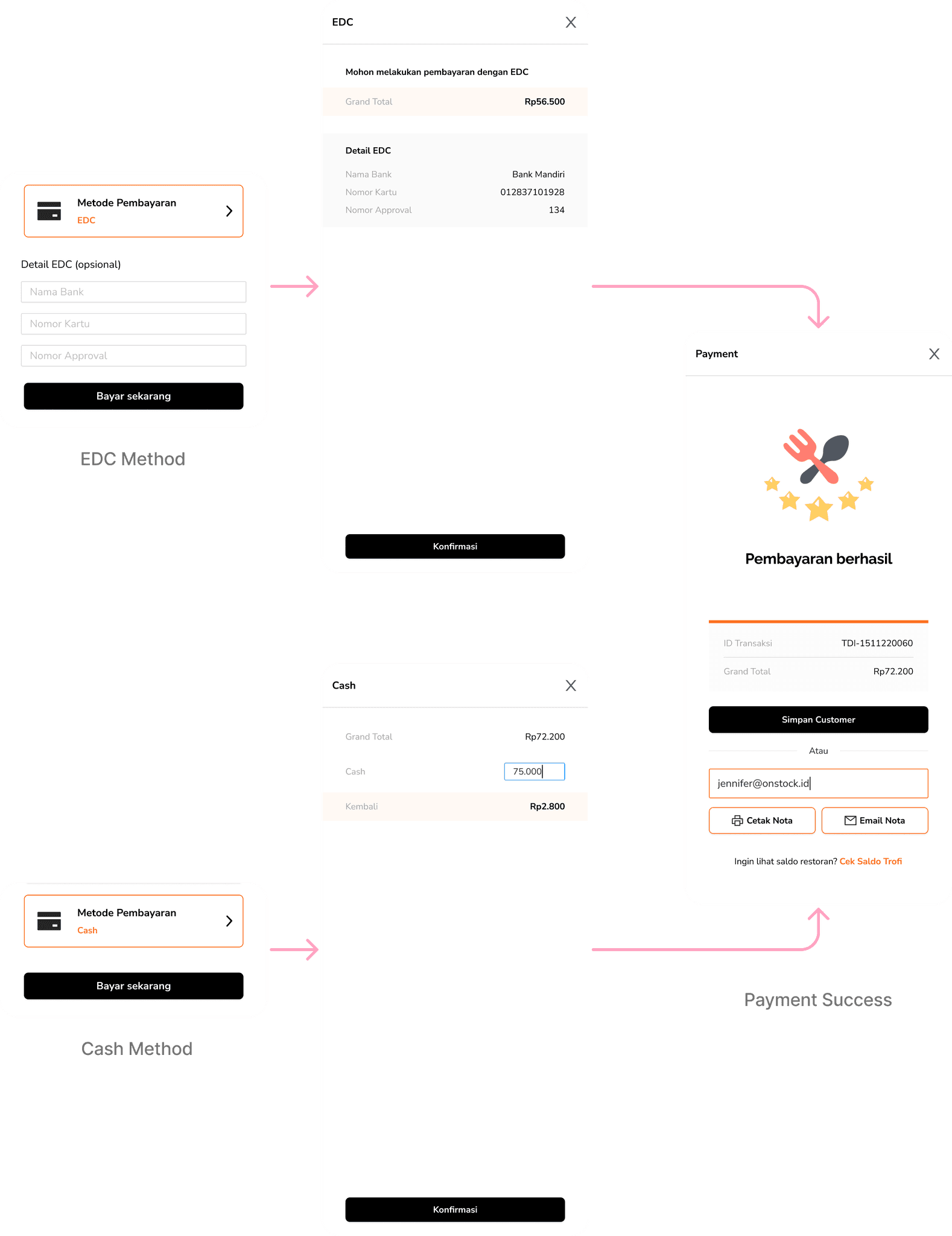
Image: Success payment flow using EDC and Cash
In the early days, there were only four available payment methods. As some restaurants needed more details for categorizing transactions and tracking payment channels, the payment flow gradually evolved to include more options.
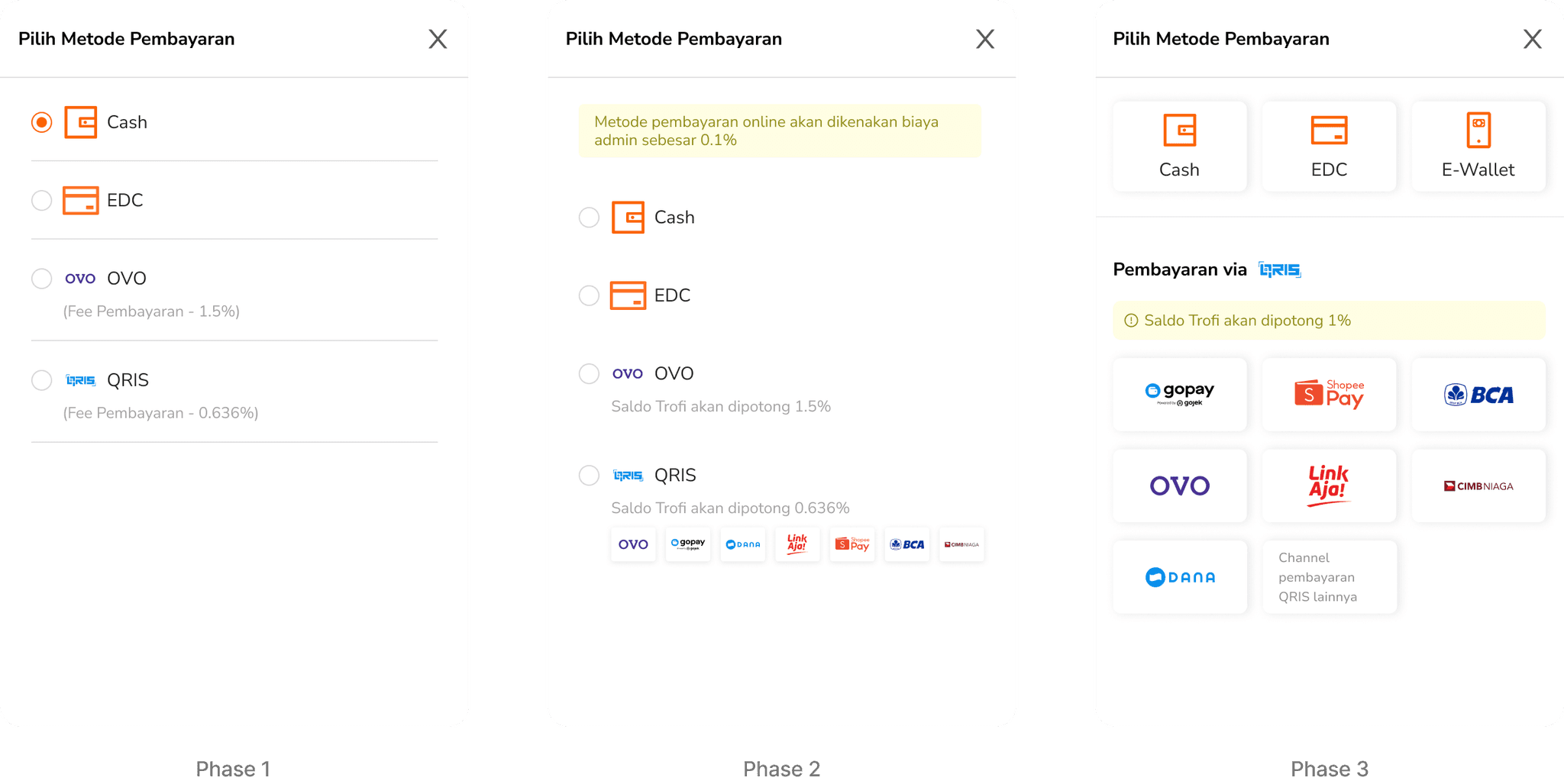
Payments made through EDC and cash are credited to Trofi’s balance labeled as “Saldo Trofi” and users can withdraw these funds at any time, giving them flexibility in managing their cash flow.
For e-wallet payments, restaurant staff can select which specific e-wallet the customer wants to use. After making their choice, the customer completes the payment manually while the restaurant confirms the transaction on their side.
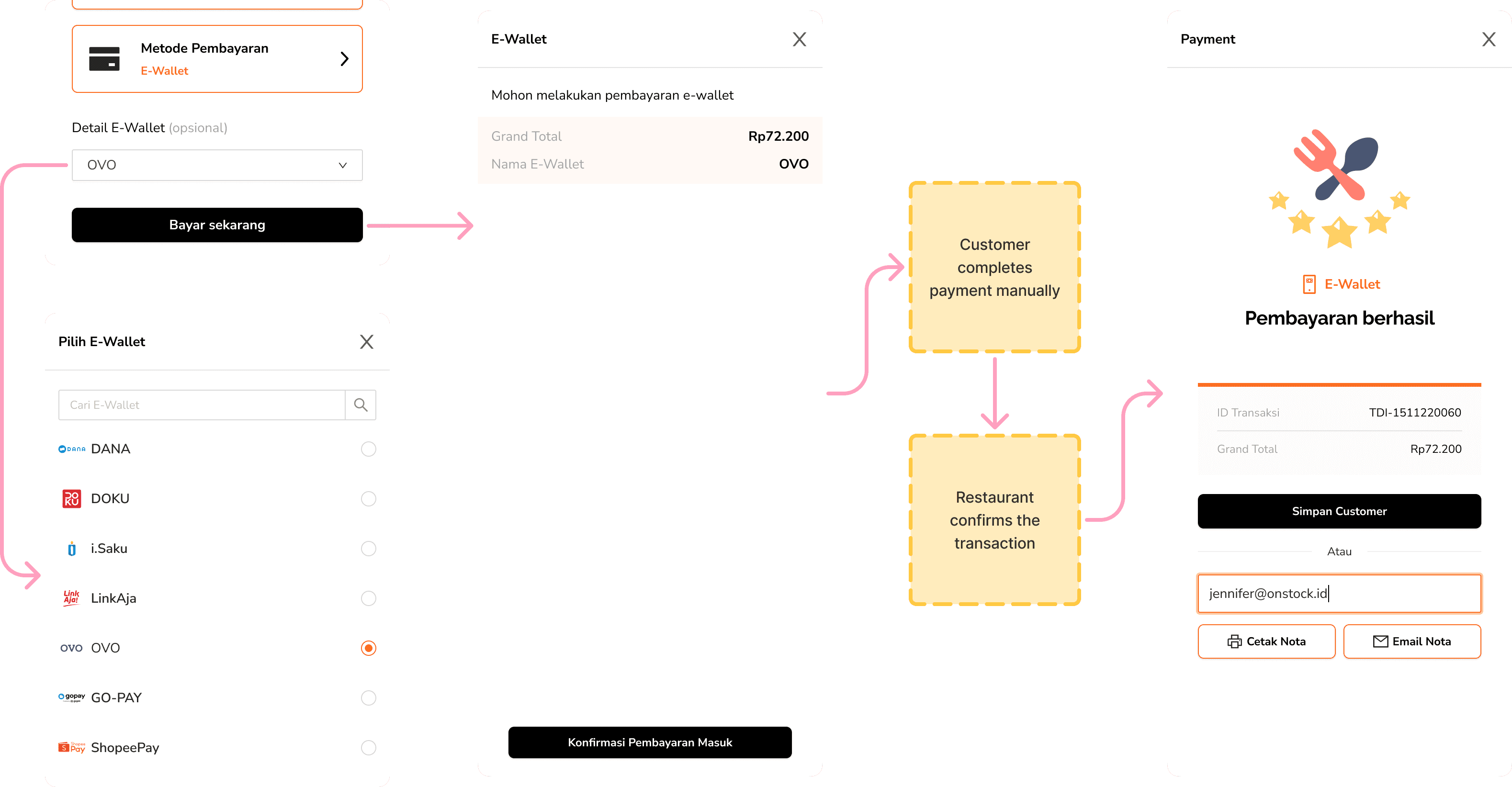
Image: Success payment flow using e-wallet
Payments via QRIS work in a similar way, where the staff selects the payment channel before proceeding. However, unlike manual e-wallet payments, QRIS transactions can be detected automatically once the payment goes through, reducing the chance of human error and speeding up the process.
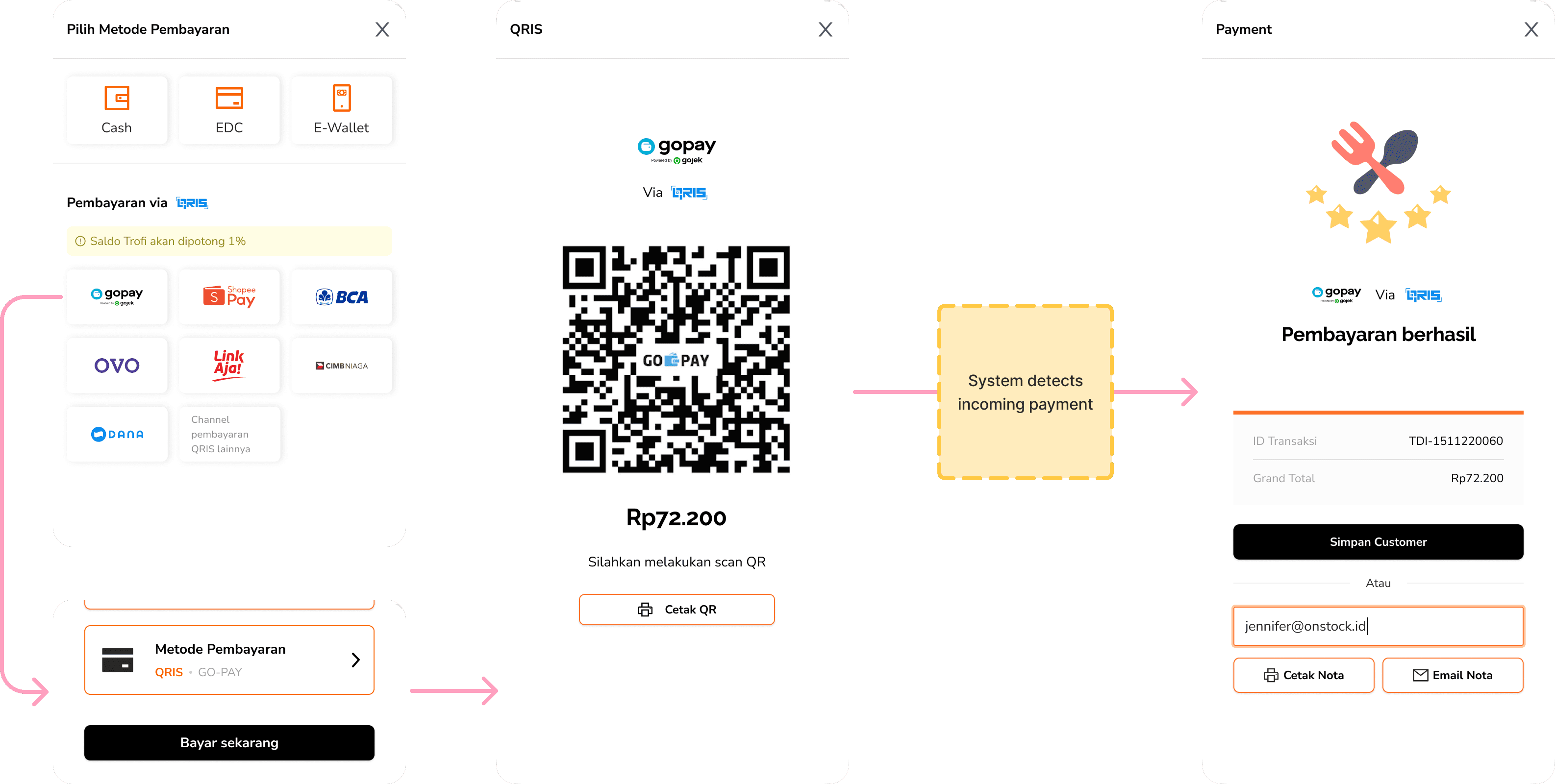
Image: Success payment flow using QRIS
Trofi also includes a Split Bill feature, which will be covered in more detail in another module.
Every transaction documented
After the transaction, users need a reliable record. I focused on making the invoice clear and accurate so staff can quickly resolve questions or print details for customers without confusion.
We ensured that the Print Invoice (Cetak Nota) button remains easily accessible at all times.
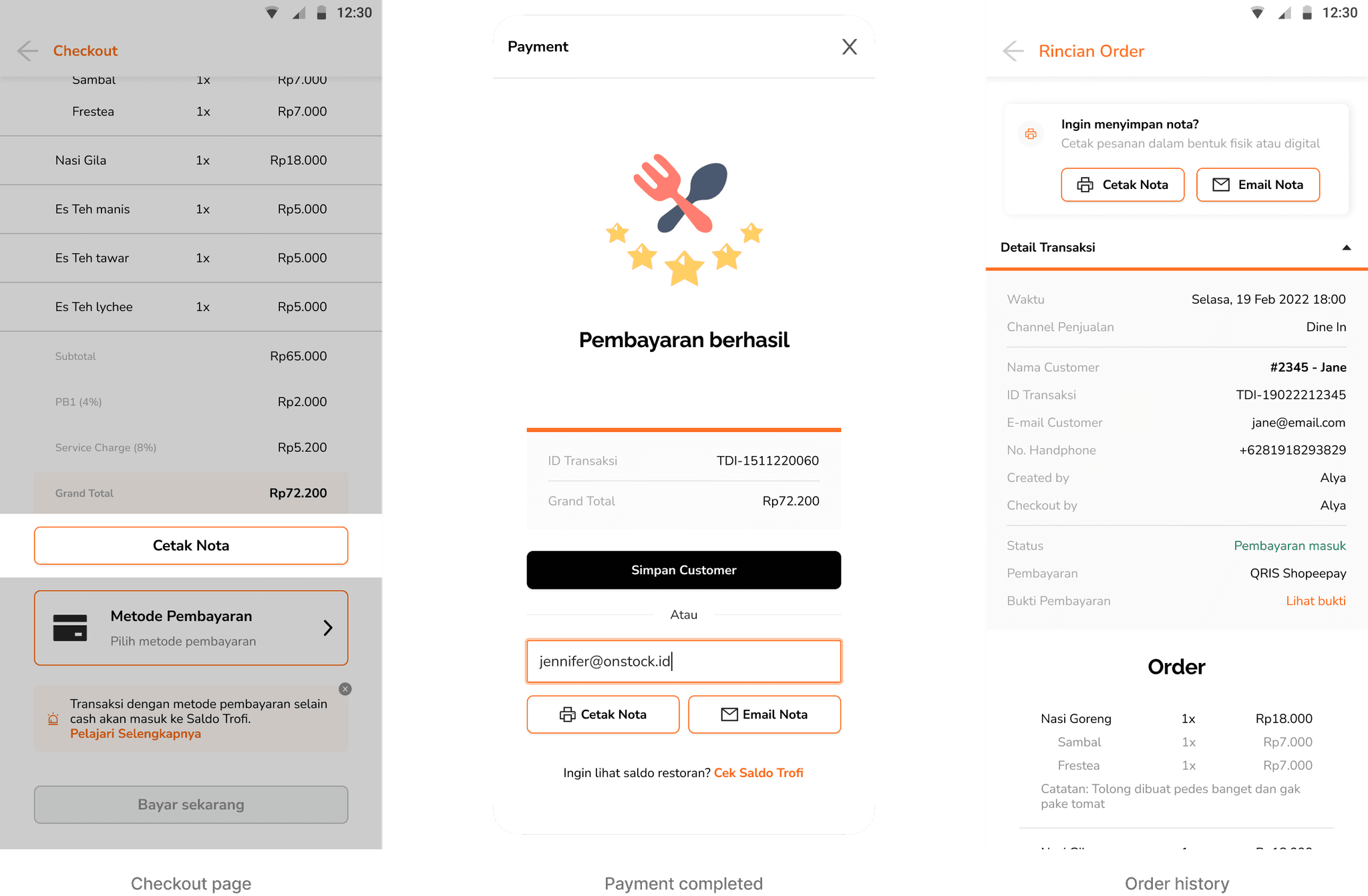
If users are in a rush and don’t have time to print immediately, they can always print the invoice later through the order history in the “Order” feature, since every transaction is recorded there.
Print or email
Users can print invoices either before or after completing a payment. However, invoice emails can only be sent once the payment is finalized.
I also designed the invoice mockups using a complete auto-layout design system. (💡 tip: hover over the image for a better view!)
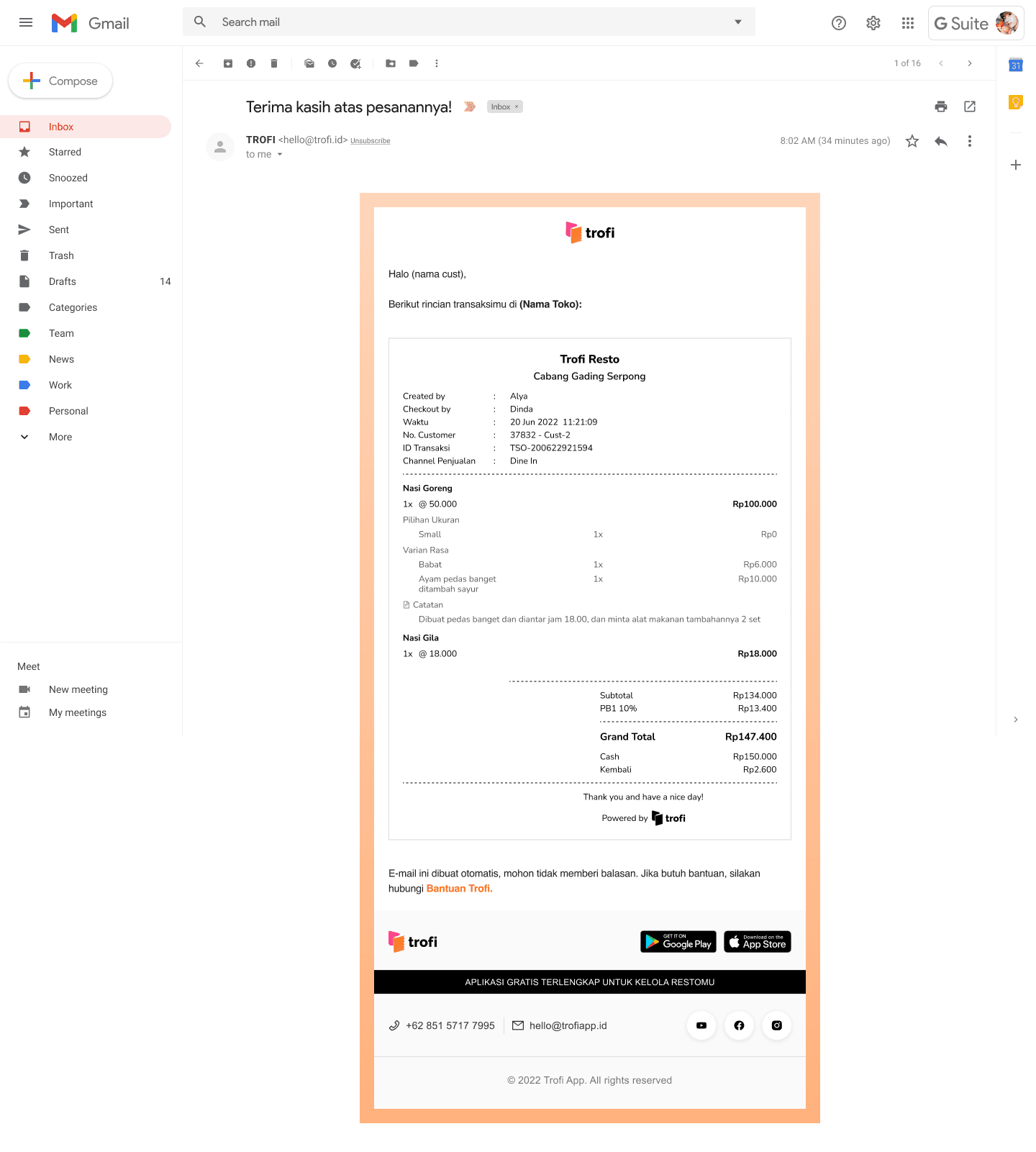
Uusability tests involving users from F&B businesses, restaurant staff, and developers
Problem 1: Payment flow clarity for QRIS
Some users were unsure whether a QRIS payment had succeeded because there was no clear way to check the payment status. This sometimes caused confusion or delays while waiting for confirmation.
I added a dedicated flow to check payment status in real time. This included both green flow (successful payments) and red flow (failed or pending transactions)
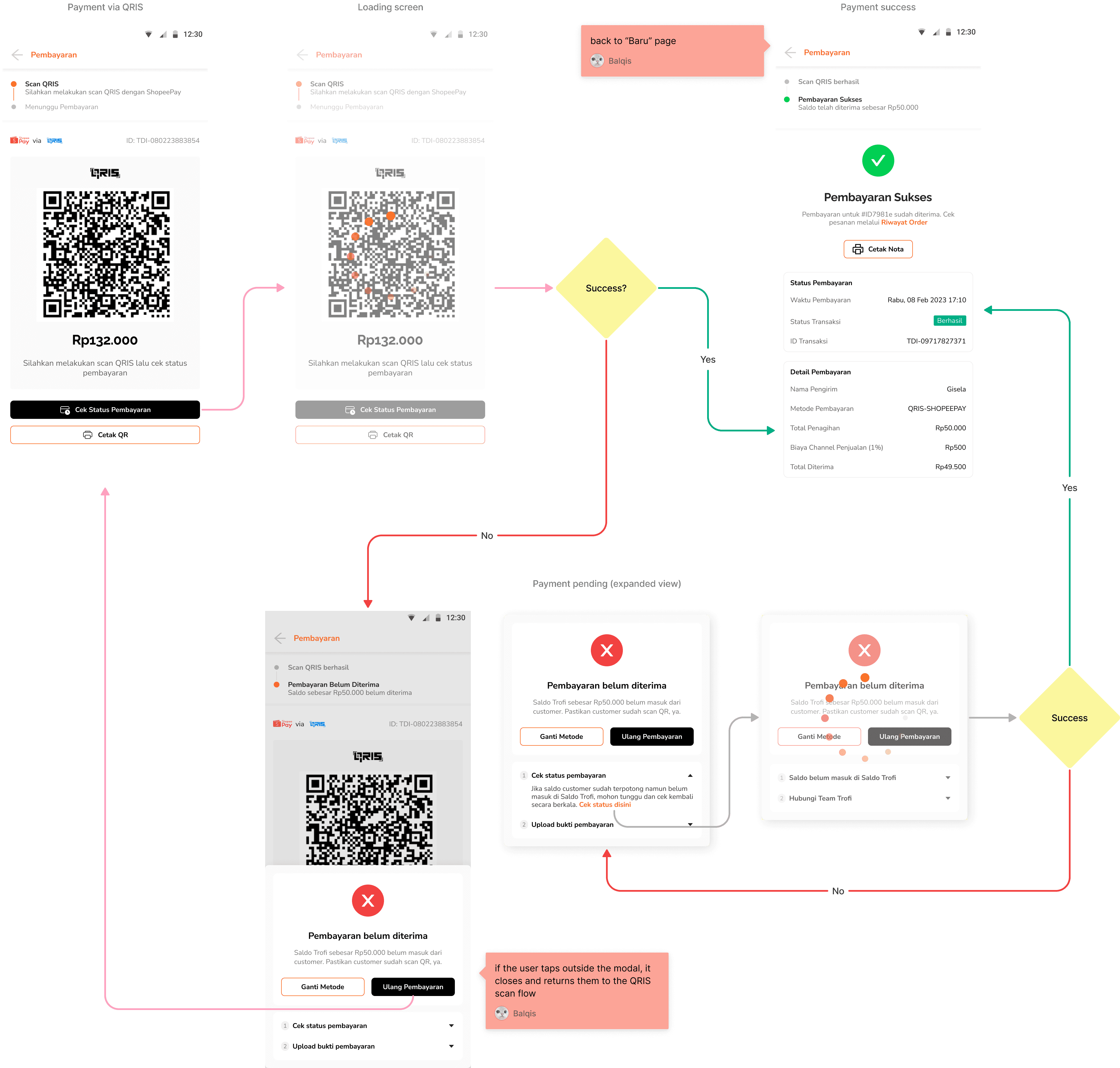
In the red flow, if the payment didn’t go through to Saldo Trofi (Trofi Balance), I also added an option for users to upload proof of payment so the Trofi team could help resolve the issue. Other than that, users can also change the payment method if the problem persists.
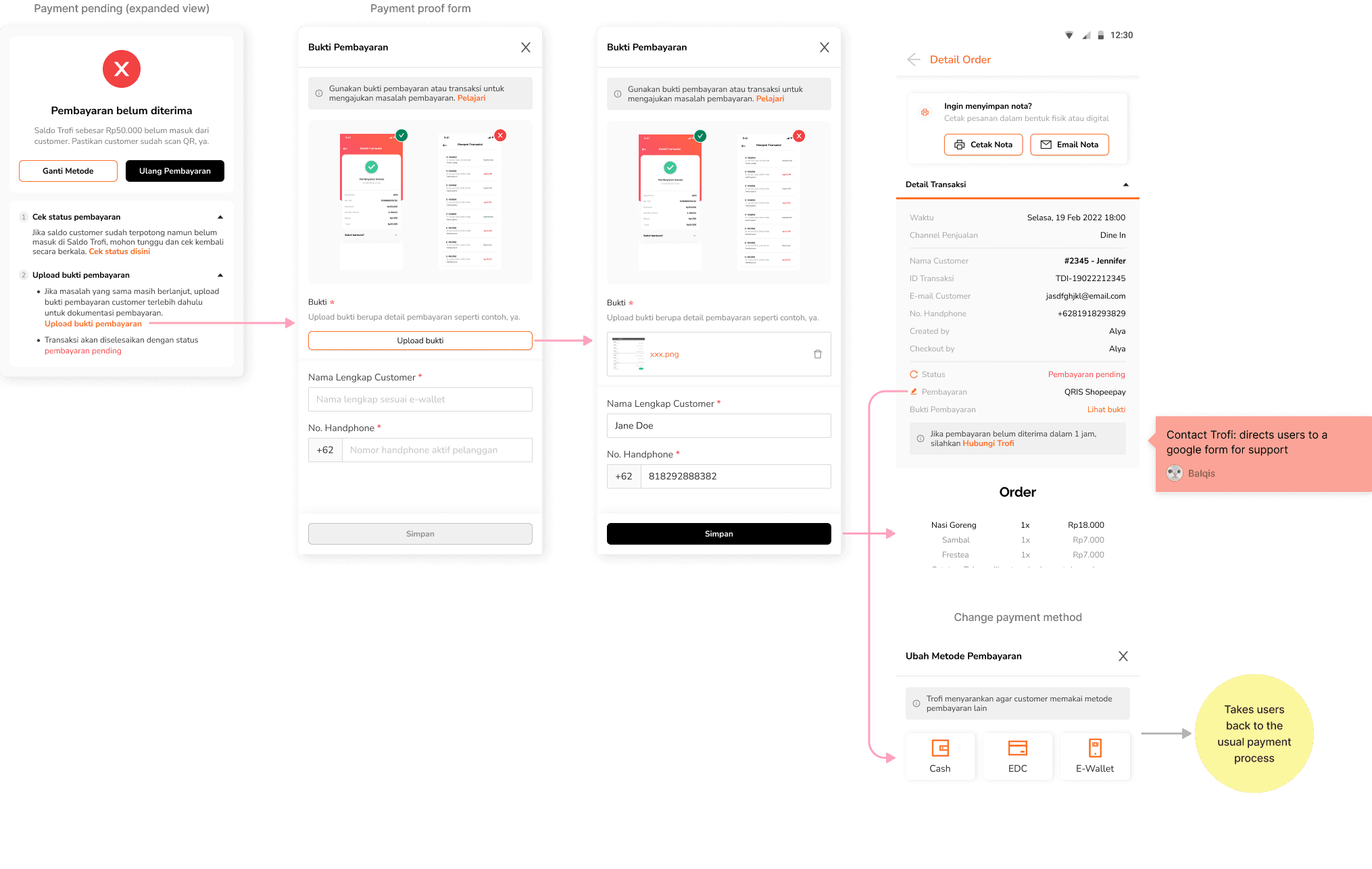
This helped staff identify payment problems and gave customers confidence that their transactions were being properly handled.
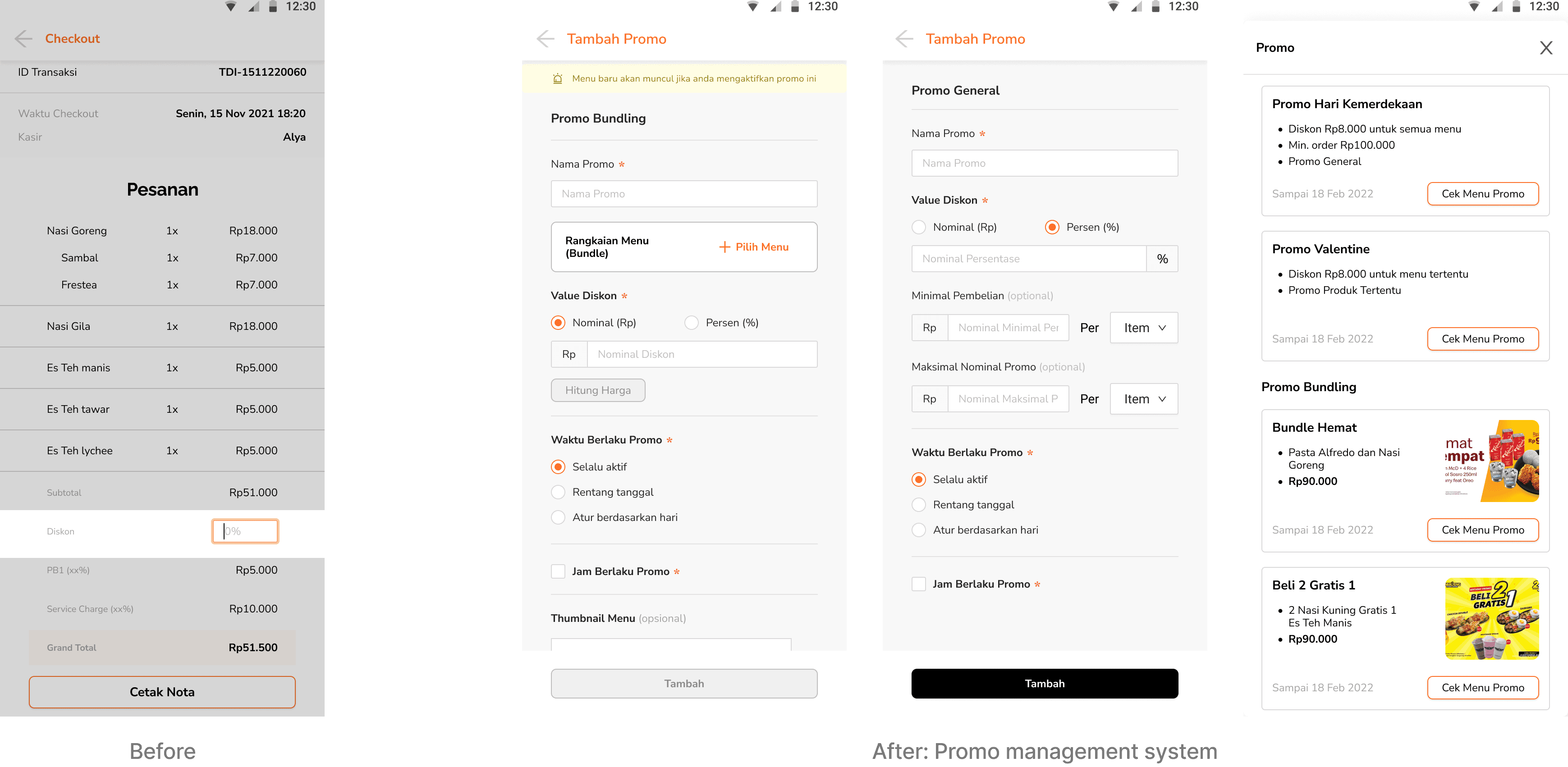
Problem 2: Applying promotions was too manual
Previously, promo amounts had to be entered manually on the checkout page. After iterating the design, we introduced a promo management system where users can simply select which promo they want to apply, making the process much faster and more convenient.
Reflections & Takeaways
Designing for the counter, not the screen
Working on sales flows made me realize that the success of a POS isn’t measured by how polished the interface looks, but by how it holds up in the everyday rush of a restaurant.
Clarity beats complexity
Even though the sales flow has to support promos, multiple payments, and invoicing, staff only care about getting through the transaction quickly and correctly. I learned that every extra click or unclear button slows them down, so clarity had to come first.
Every pixel counts
Tiny adjustments like improving button behavior or touch areas can have a big impact. Due to time limits, some early decisions weren’t optimal, but they became a strong reminder that UX clarity should always be prioritized and refined over time.
Adaptability is everything
Real-world needs changed as the business evolved. Through user research and feedback from restaurants, I learned how flexible design systems allow for quick and effective adjustments.
Build for your team too
Developers and PMs are users too. Working in this module made me realize that offering clarity in handoffs, creating flows that made sense to them, and thinking from their perspective made collaboration more human and much more efficient. Logical flows also helped the team work more smoothly, especially during iterations and debugging.
A Lasting Note
Built with purpose, remembered with warmth
Although the work eventually came to an end, it ran successfully for nearly three years and found a place in the daily routines of real users. Many of them shared kind words when it stopped—and that, more than anything, reminded me why I love building things that help ♥︎